Wiring a Widget to Dynamic Materials in Unreal Engine (Skill Check Gauge)
The Blueprint seam of a radial skill check: create dynamic material instances for the two zone arcs and the background ring, then on every update push the component's normalized zone values into the materials' Angle, Radius, and Color parameters.
This is step five of the Radial Skill Check in Unreal Engine guide. The arc material can draw any slice from two numbers; this step is the thin Blueprint seam that feeds it those numbers from the component. It is the one place gameplay and visuals meet.
Two custom events, run in order
The widget’s event graph is small. An Event On Zone Values Updated (the C++ base
calls this whenever the zone values change) runs a Sequence of two custom events: first
build the materials, then push the current values in.
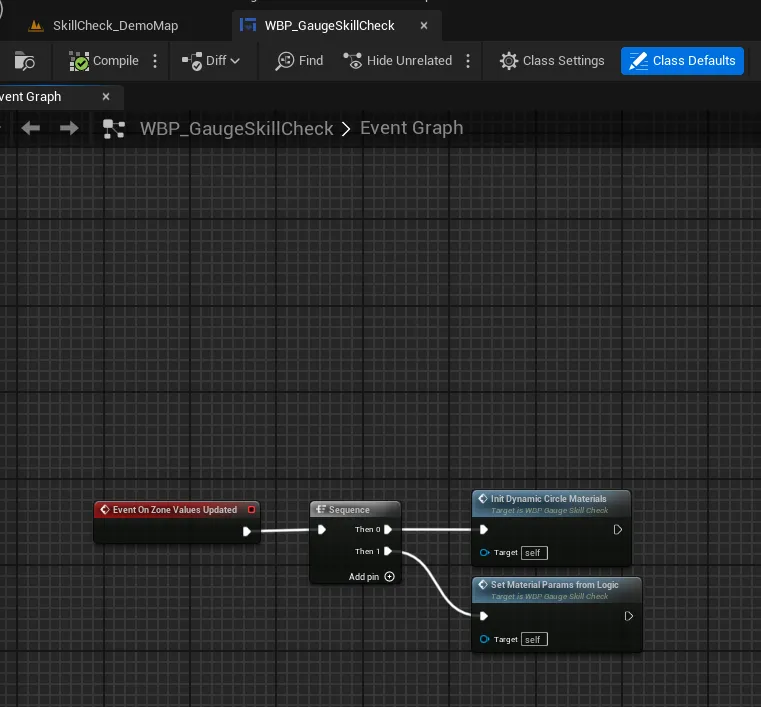
Splitting it this way means the dynamic material instances are created once and then only have their parameters updated, rather than rebuilt every change.
Init: create the dynamic instances
The first event, Init Dynamic Circle Materials, creates a Dynamic Material Instance for each of the three circle images and assigns it as that image’s brush:
M_DynamicRadialSlice-> a MID stored as Dynamic Circle Good ->Set Brush from Materialon Image_AreaGood;M_DynamicRadialSlice-> a MID stored as Dynamic Circle Great ->Set Brush from Materialon Image_AreaGreat;M_StaticBackgroundCircle-> a MID stored as Dynamic Background Circle ->Set Brush from Materialon Image_StaticCircle, then aSet Vector Parameter Valueto tint it with the background color.
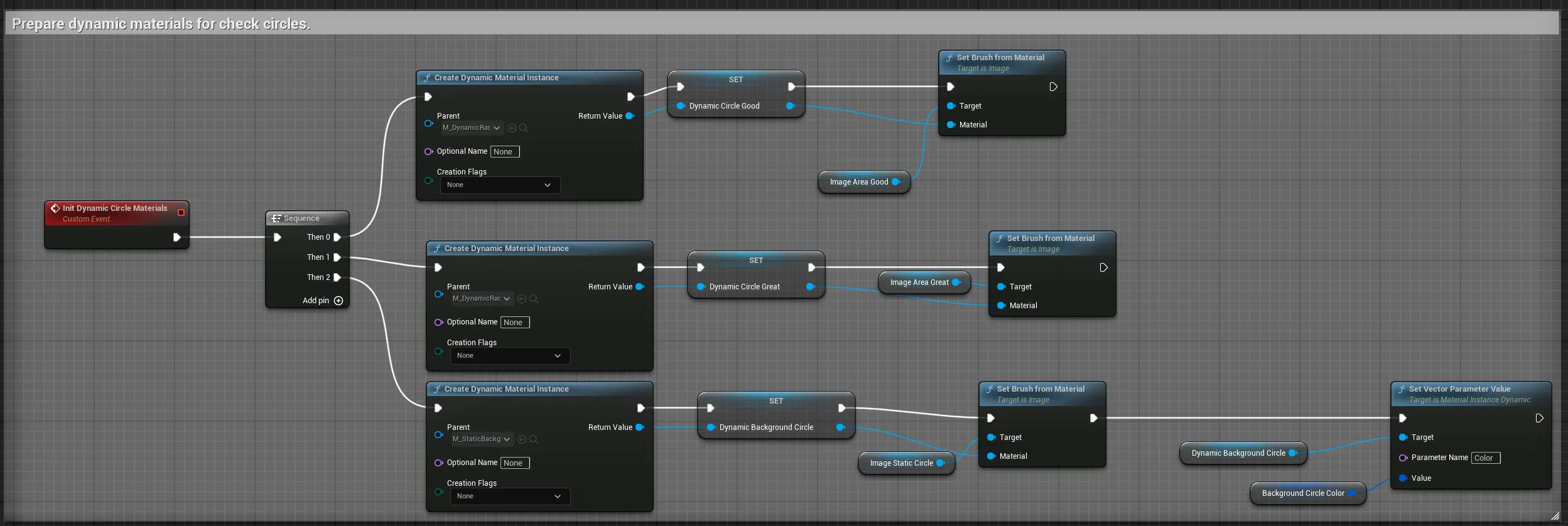
The two arc instances share the same parent material; they differ only in the parameters set next. A plain material asset cannot be changed at runtime, which is the whole reason for making instances here.
Set params: push the numbers in
The second event, Set Material Params From Logic, is where the component’s values land. For each arc MID it writes three parameters:
Set Scalar Parameter ValueRadius = the zone size (good or great), the arc length;Set Scalar Parameter ValueAngle = the zone start angle (good start, or the great zone’s own start);Set Vector Parameter ValueColor = that zone’s color.
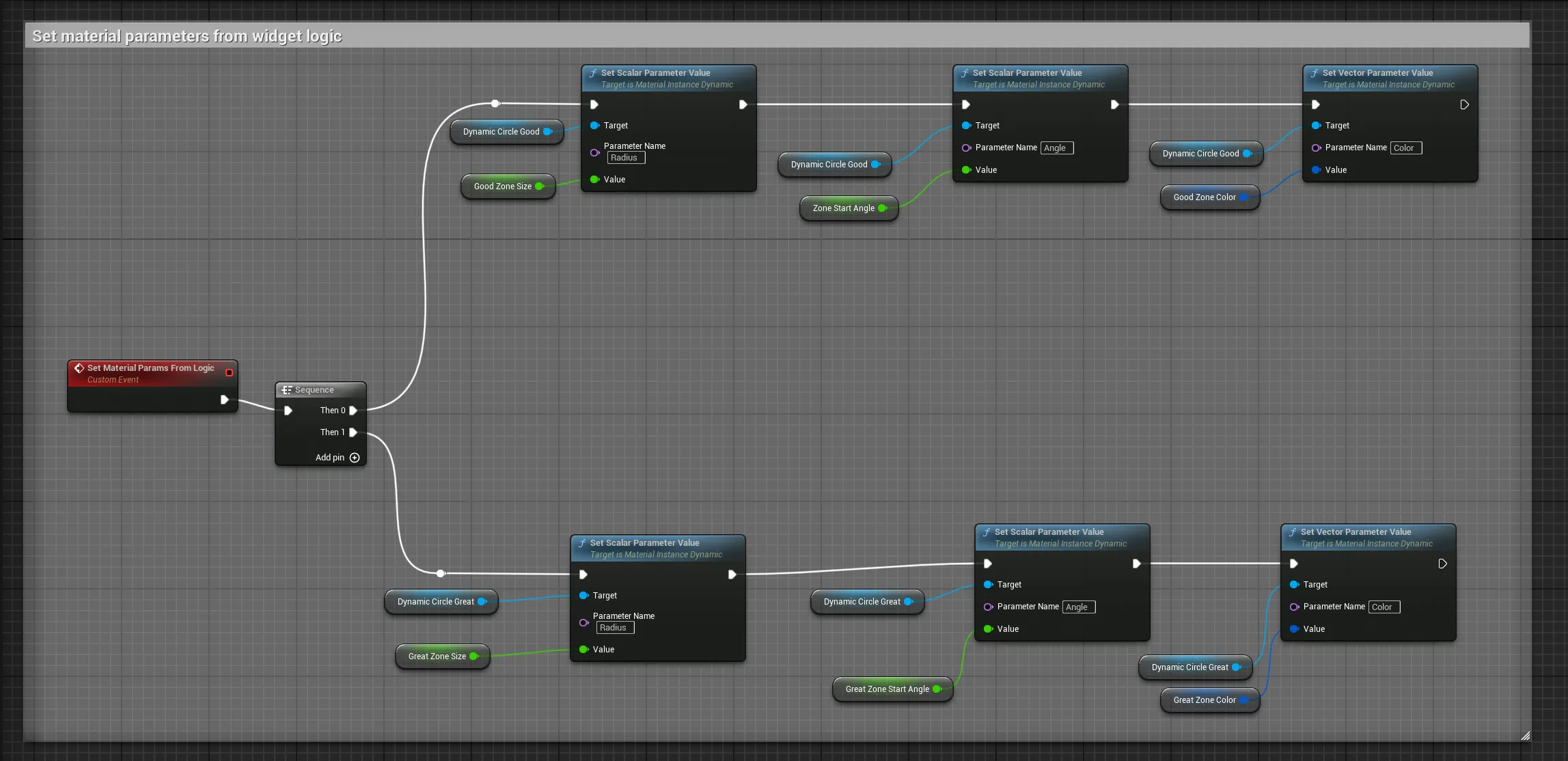
Those values are exposed by the C++ base class. The component calls SetGoodZoneSize,
SetGreatZoneSize, SetZoneStartAngle, and SetGreatZoneStartAngle (which wrap negatives
back into 0-1), then triggers OnZoneValuesUpdated, so by the time this graph runs the
widget already holds the correct, freshly randomized numbers. You are just copying them
into the material.
Why the seam is so thin
This is the entire contract between logic and visuals: three parameters per arc, set on one
event. The component does not know the material exists; the material does not know the
gameplay exists. That is what lets you restyle the gauge freely. As long as your widget
keeps the bound Image_Gauge and SizeBox_Container the base class expects, and writes the
zone values into something, you can rebuild the dial however you like, swap the arc art,
add a glow, draw it with a different technique entirely.
With the gauge drawn and driven, the remaining steps are pure gameplay: scoring the stop and firing events, and triggering checks.
Frequently asked questions
- Why create dynamic material instances instead of using the materials directly?
- A plain material cannot have its parameters changed at runtime. A Dynamic Material Instance (a MID) can, so each gauge gets its own instance whose Angle, Radius, and Color you set per check. The good arc, great arc, and background ring each get their own MID.
- When does the widget push values into the materials?
- On the OnZoneValuesUpdated event, a BlueprintImplementableEvent the C++ base calls after the component sets the zone sizes and start angles. The widget reads those exposed values and writes them into the material parameters.
- Which parameters get set?
- For each zone's MID: the Radius scalar (the zone size or arc length), the Angle scalar (the zone start angle), and the Color vector. The background ring MID just gets its color. The needle is rotated by C++, so it needs no parameters.