Drawing a Radial Arc with a Material in Unreal Engine
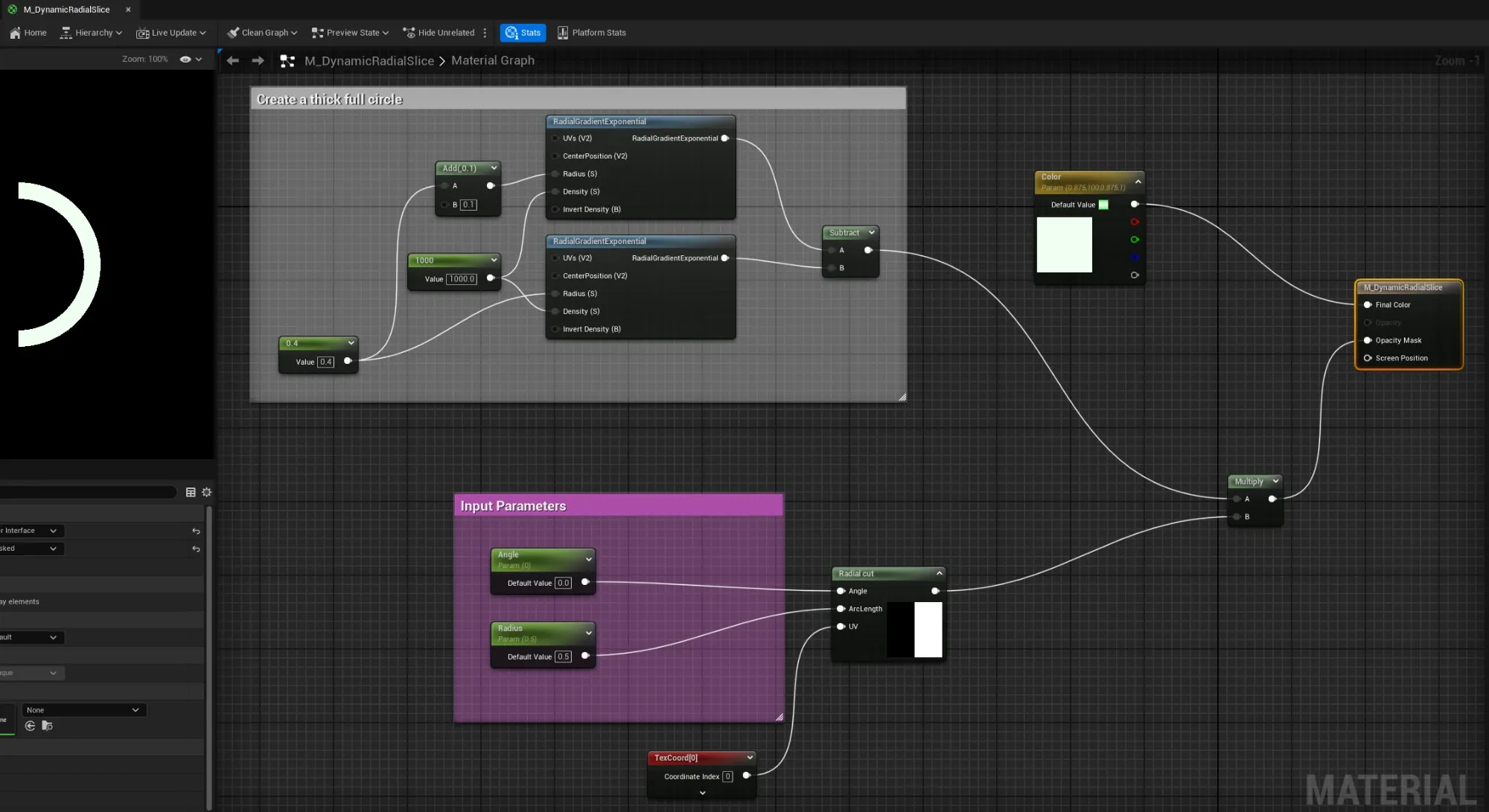
How the skill check zones are drawn: a UMG material that builds a thick ring from two RadialGradientExponential nodes, then cuts an arc out of it with a radial-cut function driven by an Angle and an arc-length parameter. The Radius parameter is the zone size.
This is step four of the Radial Skill Check in Unreal Engine guide, and the part the marketing walkthrough skips. The C++ never draws anything: the colored good and great arcs are a material. Get this material right and the widget wiring is almost trivial.
The goal: an arc you can resize and aim
Each zone is a slice of a ring: it starts at some angle and spans some arc length, both
normalized 0-1. The material, M_DynamicRadialSlice, takes exactly two scalar parameters
plus a color:
- Angle: where the arc begins (0-1 around the dial);
- Radius: the arc length, that is, how much of the ring the slice covers (the zone size). The name is a historical quirk; think “arc length,” not “circle radius.”
- Color: the slice’s color.
Those map one to one onto the component’s values: Angle is the zone start, Radius is
the zone size. Drawing the great zone is the same material with smaller numbers.
Step 1: a thick full circle
The base shape is a crisp ring. The trick is two RadialGradientExponential nodes
sharing a high Density (1000), which turns the soft gradient into a hard-edged filled
disc, at two radii a small step apart:
- one disc at radius
R(for example0.4); - one disc at radius
R + 0.1(anAddnode, the thickness).
Subtract the smaller disc from the larger and what is left is the area between them: a thin, sharp ring. Because the density is so high, the edges are clean rather than feathered. That ring is the “thick full circle” the graph comment calls out; it is the donut every slice is carved from.
Step 2: cut the arc
A full ring is not a zone yet. A material function, Radial cut, takes three inputs and returns a mask of just the wedge you want:
- Angle: the start angle, wired from the
Angleparameter; - ArcLength: how far the wedge spans, wired from the
Radiusparameter (the zone size); - UV: the texture coordinates (
TexCoord[0]).
It compares each pixel’s angle around the center against [Angle, Angle + ArcLength] and
keeps only what falls inside. That is your wedge mask.
Step 3: ring times wedge
Multiply the ring from step 1 by the wedge from step 2 and you get the intersection: the ring, but only across the slice. That product goes to Opacity Mask, so the image is opaque exactly on the arc and transparent everywhere else. The Color parameter feeds the final color, so the same material draws a soft green good zone or a hot orange great zone purely by parameter.
Two instances of this one material, with different Angle, Radius, and Color, draw
both zones.
The background ring
Behind the two arcs sits the full circle so the dial always looks complete.
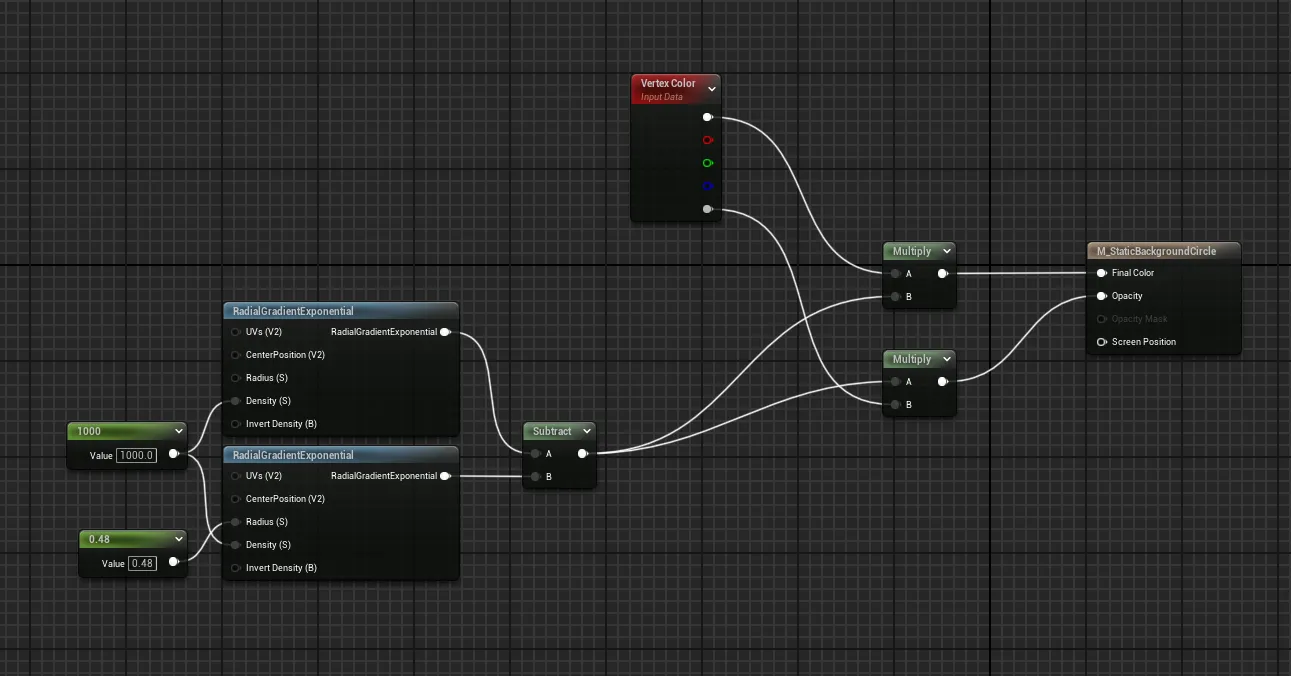
M_StaticBackgroundCircle reuses the same two-gradient ring (a RadialGradientExponential
at radius 0.48 subtracted to leave a ring) but skips the radial cut: it is the whole
circle, not a slice. It is tinted by its own color and never resizes, which is why it lives
on its own Image_StaticCircle and is created once.
Why this design
Pushing the shape into a material means the gauge is vector-crisp at any size (no fixed texture to pixelate), and resizing or repositioning a zone is just setting a float. There are no per-frame redraws of geometry, no render targets, just two scalar parameters the widget updates when the zone values change. That update is the next step: wiring the widget to the materials.
Frequently asked questions
- What does the Radius parameter on the material control?
- Despite the name, it controls the arc length, the angular size of the slice, not the circle's radius. The widget sets it to the good or great zone size. The Angle parameter sets where the arc starts. Both are the normalized 0-1 values that come from the component.
- How is the ring shape made?
- Two RadialGradientExponential nodes with radii a small distance apart (for example 0.4 and 0.5) and a very high density (1000) produce two hard-edged filled circles. Subtracting the smaller from the larger leaves a thin, crisp ring, the donut you cut the arc from.
- Why is there a separate background circle material?
- M_StaticBackgroundCircle draws the full, uncut ring behind the zones so the dial always reads as a complete circle. It uses the same two-gradient ring trick but skips the radial cut, and it is tinted by its own color, so it never moves or changes size.