Fog of War Beacons with Niagara Grid2D in Unreal Engine
Inside the beacon Niagara system for Unreal Engine fog of war: a Grid2D-to-render-target setup whose GPU simulation stages clear the grid, stamp every beacon's spotlight into cells, and copy it to the render target the fog material samples, with no particle renderer.
This is step seven of the Top-Down Fog of War in Unreal Engine
guide, and the last piece. The previous step
packed every beacon into FVector4 arrays and handed them to the
NS_Beacon_Locations_To_RenderTarget system. This step is what that system does with them:
rasterize each beacon’s spotlight into the render target the fog material samples.
A Grid2D system, not a particle system
NS_Beacon_Locations_To_RenderTarget is a GPU emitter built on the Grid2D to render
target pattern, not a particle renderer. The structure is a single emitter with no
renderer at all:
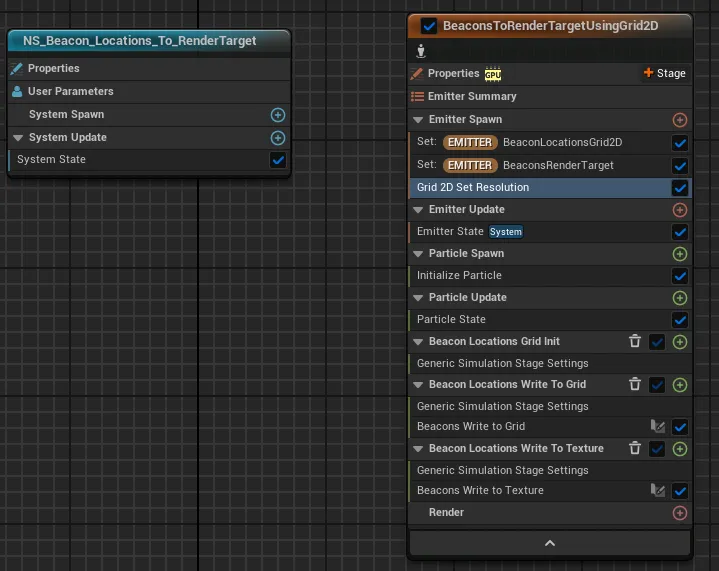
- Emitter Spawn creates a
Grid2Dcollection and binds the outputBeaconsRenderTarget, then sizes the grid with the stock Calculate Grid Resolution module. - Three simulation stages run on the GPU each frame:
- one clears the grid;
- a custom Beacons Write to Grid stage walks the
BeaconLocationsAndSizesandBeaconFOVDataarrays and stamps each beacon’s sphere-and-cone falloff into the grid cells (the same radius and FOV math as the player spotlight, evaluated per beacon); - a final Beacons Write to Texture stage copies the grid into the render target.
- There is no renderer on the emitter: the system exists only to fill that texture, which the fog material then reads as another spotlight mask.
Sizing the grid
The grid resolution comes from the stock Calculate Grid Resolution module. It turns a world extent and a max-axis cell count (128 here) into the Grid2D resolution with a Custom HLSL node. It ships with the Grid2D templates, so you do not write it yourself; you just feed it the same map extent everything else uses, so the beacon mask lines up with the floor and the player spotlight.
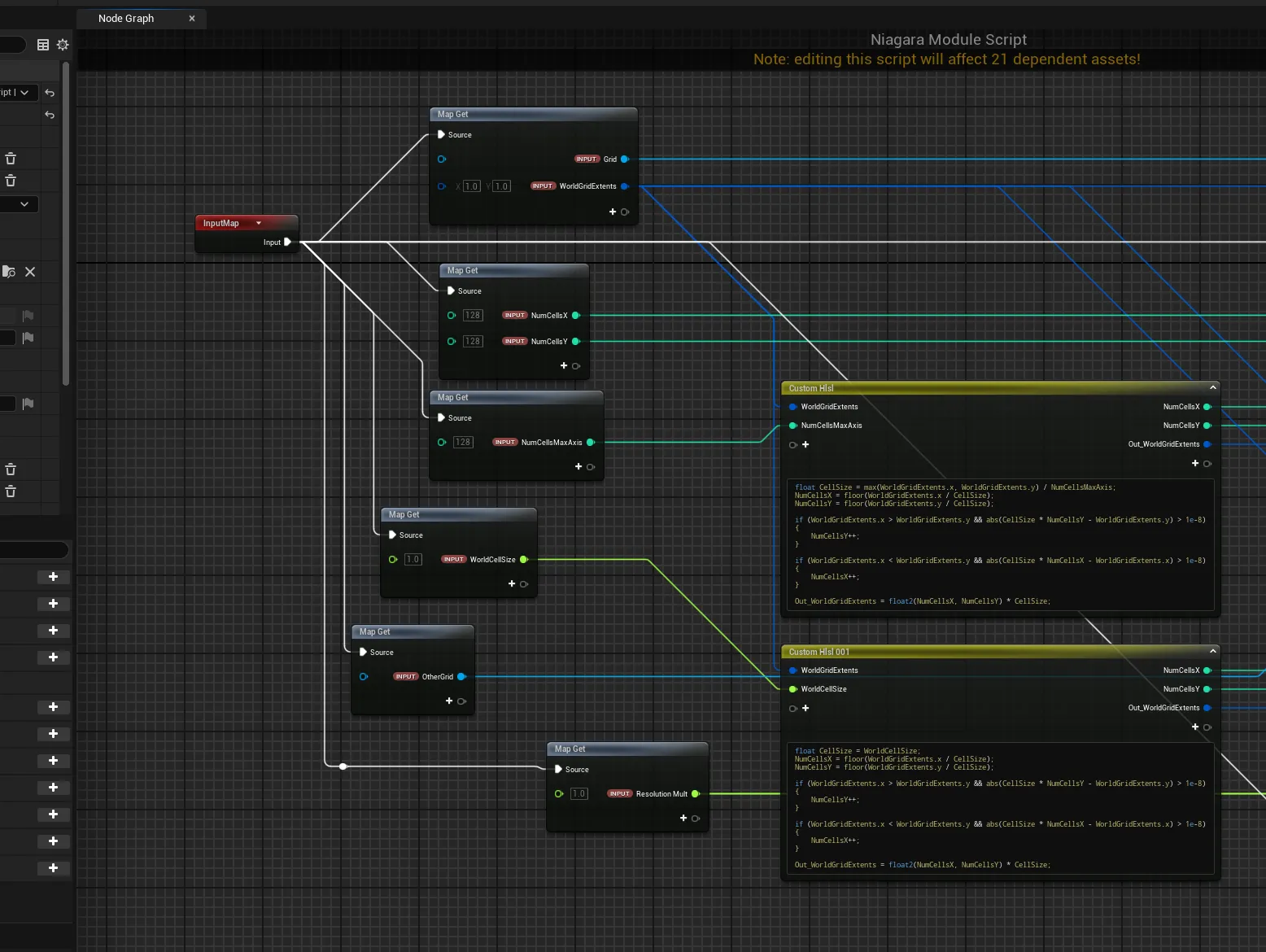
Here is the Grid2D_SetResolution module graph to inspect node by node:
The output is the beacon render target step six already wired into the material as
Beacon Spotlights: a single texture holding every beacon’s spotlight, unioned with the
player reveal by a max.
That completes the system
With the introduction, actors and components, the Fog Manager, the master material and its shadows, the player reveal, the beacon handoff, and this Niagara system, you have the complete top-down fog of war: one actor pumping live data into one material, plus a small GPU helper for the beacons. The guide hub ties all the steps together.
If you would rather drop this into your project ready-made, the Multiplayer Fog of War plugin packages all of this up, replicated and performance-minded, for multiplayer and single-player top-down games.
Frequently asked questions
- Does the beacon system use a particle renderer?
- No. It is a Grid2D-to-render-target setup with simulation stages (clear the grid, write beacons to the grid, copy the grid to a texture) and no renderer; it exists only to fill the beacon render target.
- What do the simulation stages do?
- Three stages run on the GPU each frame: one clears the grid, a Beacons Write to Grid stage stamps each beacon's sphere-and-cone falloff into the cells, and a Beacons Write to Texture stage copies the grid into the render target.
- What is the Calculate Grid Resolution module?
- A stock Grid2D module that turns a world extent and a max-axis cell count (128 here) into the grid resolution. It ships with the Grid2D templates, so you do not write it yourself.