Fog of War Master Material in Unreal Engine: Mask, Occluders, and Cliff Shadows
How M_Main_Fog_Volume controls light and shadow in Unreal Engine fog of war: the dark-to-lit lerp, the combined mask, custom-stencil vision occluders that stay unlit, and a scene-capture cliff-shadow mask subtracted from the reveal.

This is step four of the Top-Down Fog of War in Unreal Engine
guide, and the heart of it. The Fog Manager
pushes live data into a dynamic instance of M_Main_Fog_Volume; this step is what that
material does with it: darken the scene, build one mask, and carve shadow back out of it.
The dark-to-lit lerp
M_Main_Fog_Volume is a post-process material that writes to Emissive Color. At its
core it is one lerp between two versions of the scene, chosen by a mask:
// SceneColor = SceneTexture:PostProcessInput0
float3 dark = SceneColor * Darkness;       // Darkness param, e.g. (0.146, 0.146, 0.146)
EmissiveColor = lerp(dark, SceneColor, mask); // mask 1 = fully visible, 0 = fogged
So the only real question is how we build mask: white where the player can currently
see, black everywhere else. Everything else in the graph produces that single
black-and-white value.
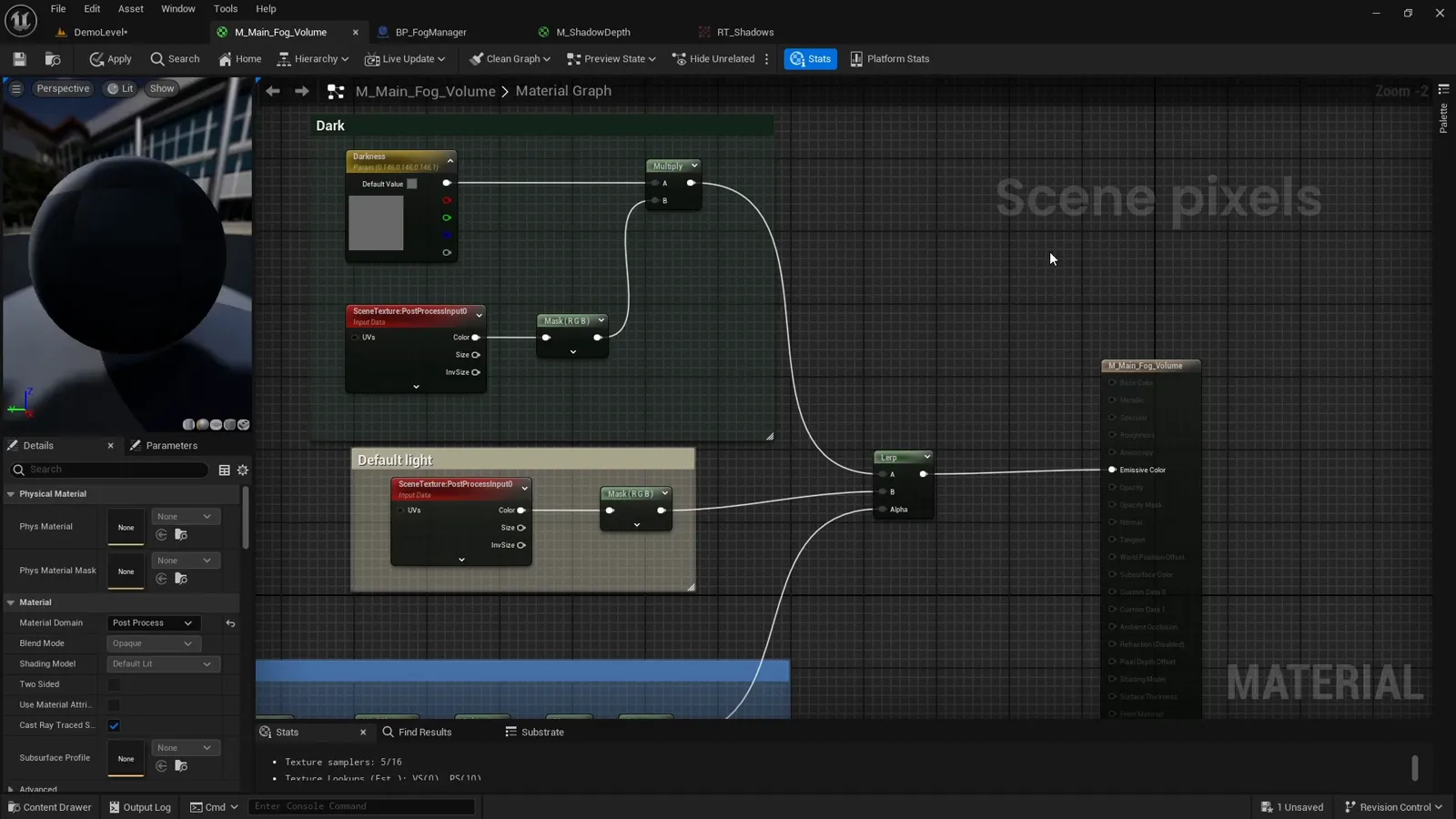
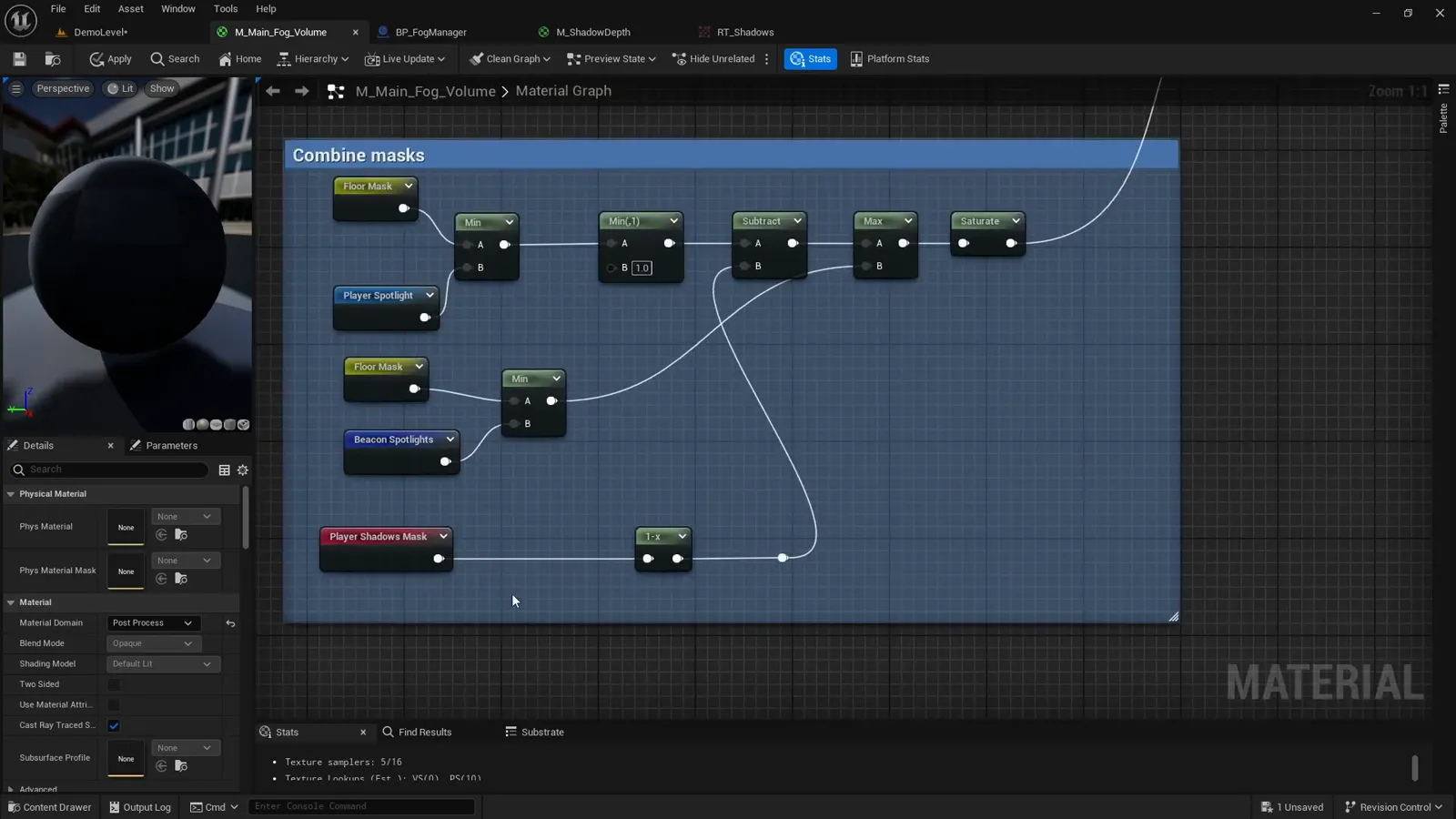
Here is the whole M_Main_Fog_Volume material graph to explore node by node:
How the masks combine
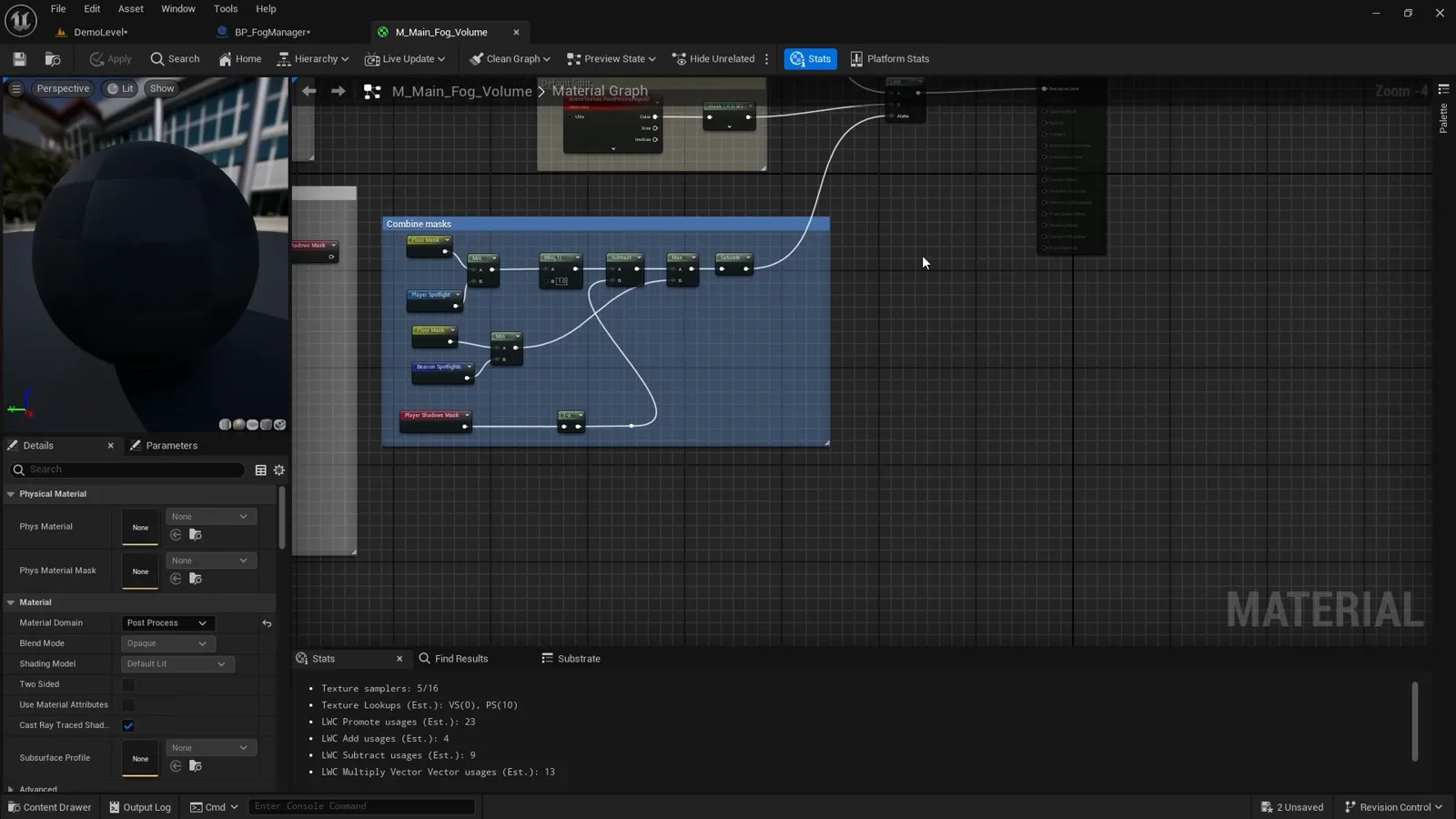
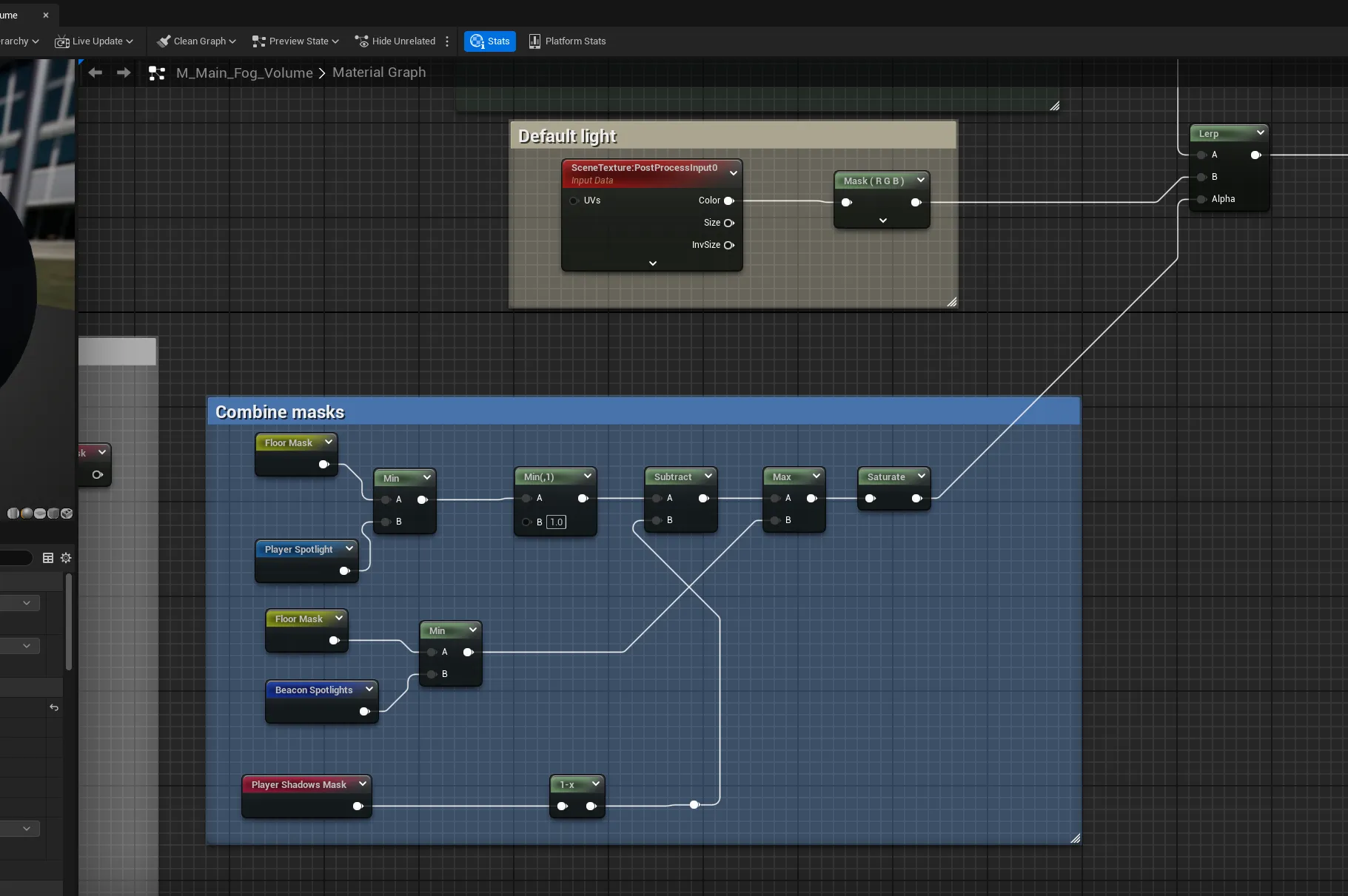
mask is several black-and-white masks combined, each built in its own step. The combine
is just three operations:
float playerReveal = min(floorMask, playerSpotlight);   // AND: lit floor the player sees
float beaconReveal = min(floorMask, beaconSpotlights);  // AND: lit floor a beacon sees
float mask         = saturate(max(playerReveal, beaconReveal) - cliffShadows); // OR, then carve shadows
min is a logical AND (a pixel lights up only where both inputs are white), max is a
logical OR (any vision source can reveal a pixel), and the shadow term is subtracted last.
The floor mask and player spotlight and
the beacon spotlights are built in their own
steps; the rest of this one is the shadow term.
The shadow term comes from occluders
A flat spotlight happily shines through walls and cliffs. To stop that, we mark which geometry blocks vision, then use it two ways: keep the occluder’s own face unlit, and cast a shadow behind it. Both start from the same mark.
Marking geometry as a vision occluder
An occluder needs three things set on its mesh:
- Render Custom Depth enabled, with Custom Depth Stencil Value = 1. This is how the material and the shadow capture isolate occluders from everything else.
- Cast Shadow disabled. We are faking vision shadows ourselves, so the mesh should not also throw a normal lighting shadow.
- A
VISION_OCCLUDERactor tag, so code can find every occluder at once.
You can set those by hand, but the plugin ships a convenience component,
UVisionOccluderComponent. Drop it on any actor and its construction event applies all
three. The C++ is just a hook that fires a Blueprint event on register:
void UVisionOccluderComponent::OnRegister()
{
    Super::OnRegister();
    OnVisionOccluderConstruction(); // BlueprintImplementableEvent
}
And the Blueprint, BP_Vision_Occluder, does the actual work on its owner’s static mesh
component:
On Vision Occluder Construction:
  Mesh = Owner -> StaticMeshComponent
  Mesh.SetRenderCustomDepth(true)
  Mesh.SetCustomDepthStencilValue(1)
  Mesh.SetCastShadow(false)
  if (!Owner.ActorHasTag("VISION_OCCLUDER")) Owner.Tags.Add("VISION_OCCLUDER")
Project setting: custom stencils do nothing until you turn them on. In Project Settings, set Custom Depth-Stencil Pass to Enabled with Stencil. Without it, every
CustomStencilread comes back empty and you will chase an “occluders do nothing” bug that is really a one-checkbox fix.
Keeping the occluder surfaces unlit
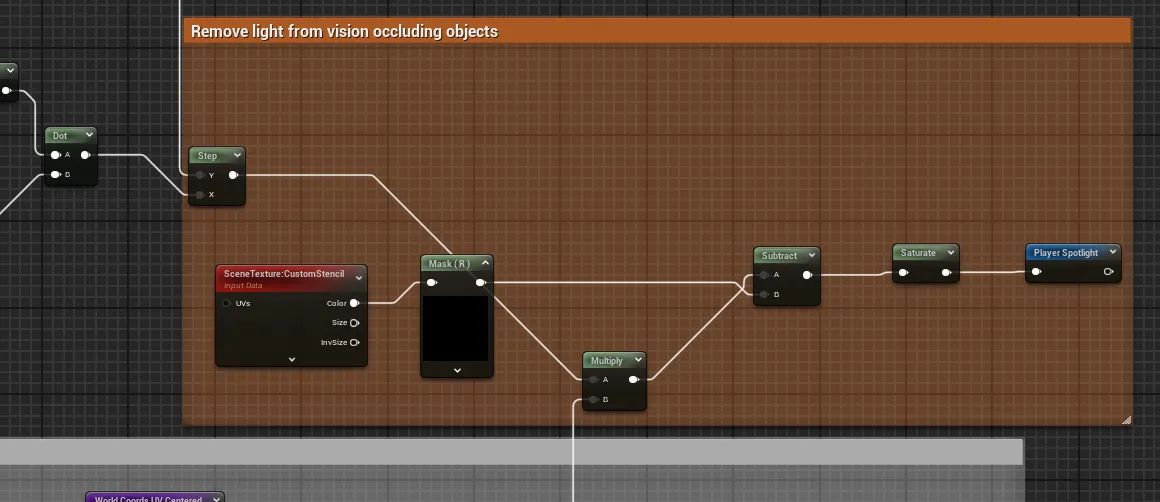
The first, cheap effect lives in the spotlight chain. Read SceneTexture: CustomStencil,
mask the occluder value, and subtract it from the sphere-and-cone spotlight before the
final saturate:
float sphere   = SphereMask(WorldCoordsUVCentered, HeroLocation, CharacterVisibilityRadius / MapSize, 90);
float inCone   = step(CharacterFOVCosHalfAngle, dot(normalize(WorldCoordsUVCentered - HeroLocation), CharacterForwardDirection.xy));
float occluder = SceneTexture_CustomStencil(uv).r; // 1 on VISION_OCCLUDER pixels
// Occluder term is multiplied by the sphere so light is only removed inside the lit area.
float PlayerSpotlight = saturate(sphere * inCone - occluder * sphere);
This stops the face of a cliff from glowing when the player stands against it, but it does nothing about what is behind the cliff.
Cliff shadows: blocking what is behind an occluder
The second effect is the player shadow mask, the only new layer in the combine. It subtracts darkness back out of the player’s lit area wherever a cliff should block their line of sight.
The first-person shadow scene capture
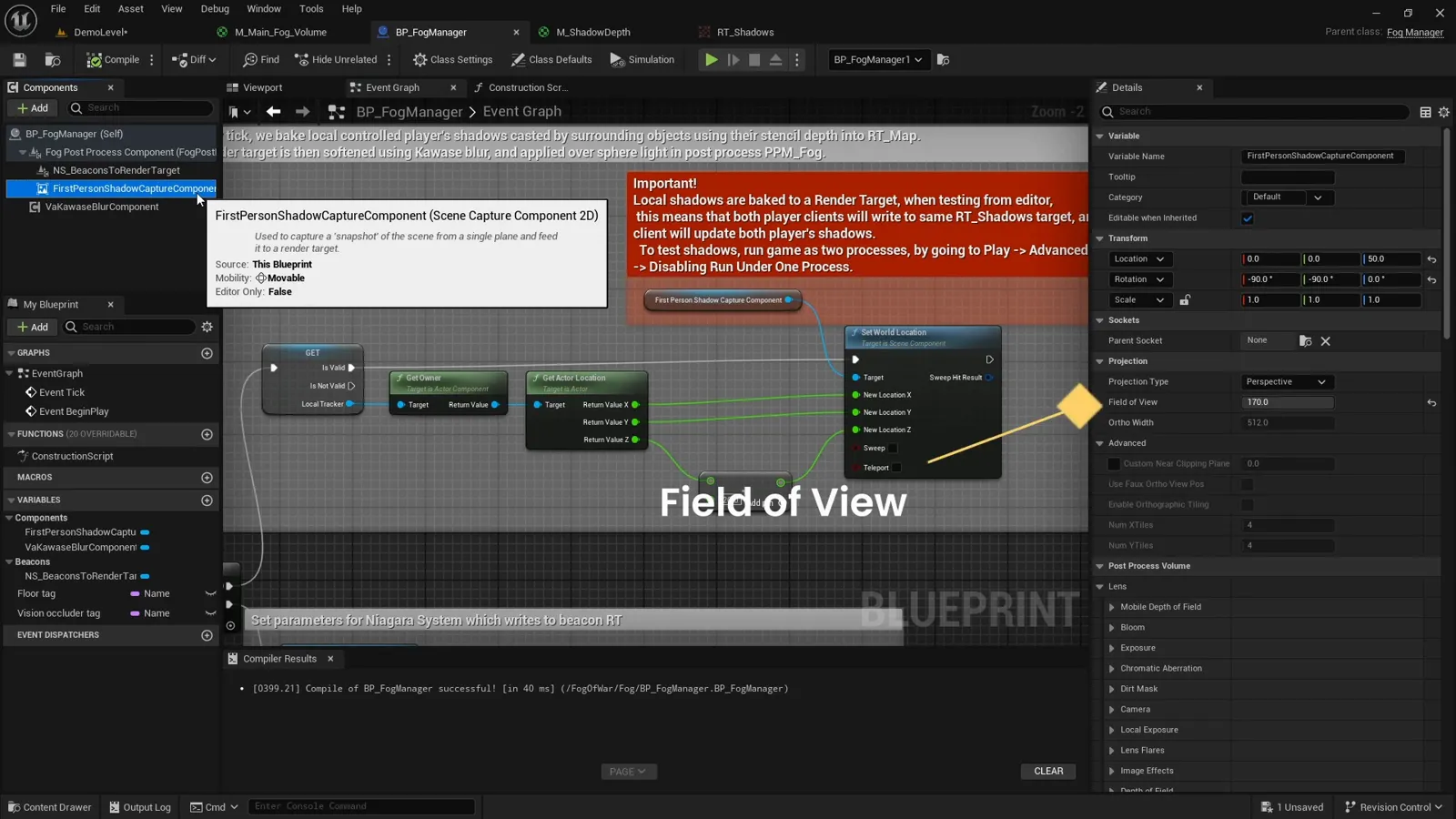
On the Fog Manager there is a USceneCaptureComponent2D called the first-person shadow
capture. It points straight down and, every tick, snaps to the locally controlled
character so it always captures the area immediately around the player:
ShadowCapture.SetWorldLocation(LocalPawn.GetActorLocation() + (0, 0, 20))Its field of view is set to 170 degrees: for some reason 180 misbehaves, but 170 is wide enough to capture the surroundings at roughly head height, which is the vantage point we need to work out what the player can and cannot see past.
Capturing only the occluders
We do not want the capture to see the whole busy scene, only the occluders. This is where
the VISION_OCCLUDER tag pays off: a C++ helper collects every actor that is not an
occluder, and we feed that list to the capture’s HiddenActors so only the tagged cliffs
and walls render:
// Everything WITHOUT the occluder tag, so the capture can hide it and keep only occluders.
TArray<AActor*> AFogManager::GetAllNonOccludingActors() const
{
    const FName OccluderTag = "VISION_OCCLUDER";
    TArray<AActor*> NonOccluders;
    for (AActor* Actor : GetWorld()->GetCurrentLevel()->Actors)
        if (Actor && !Actor->ActorHasTag(OccluderTag))
            NonOccluders.Add(Actor);
    return NonOccluders;
}

// On the capture: ShadowCapture->HiddenActors = GetAllNonOccludingActors();
The scene capture writes into a render target. On its own it is a busy top-down capture of the area around the player; it is not yet anything the fog can use.
Converting the capture to a shadow mask
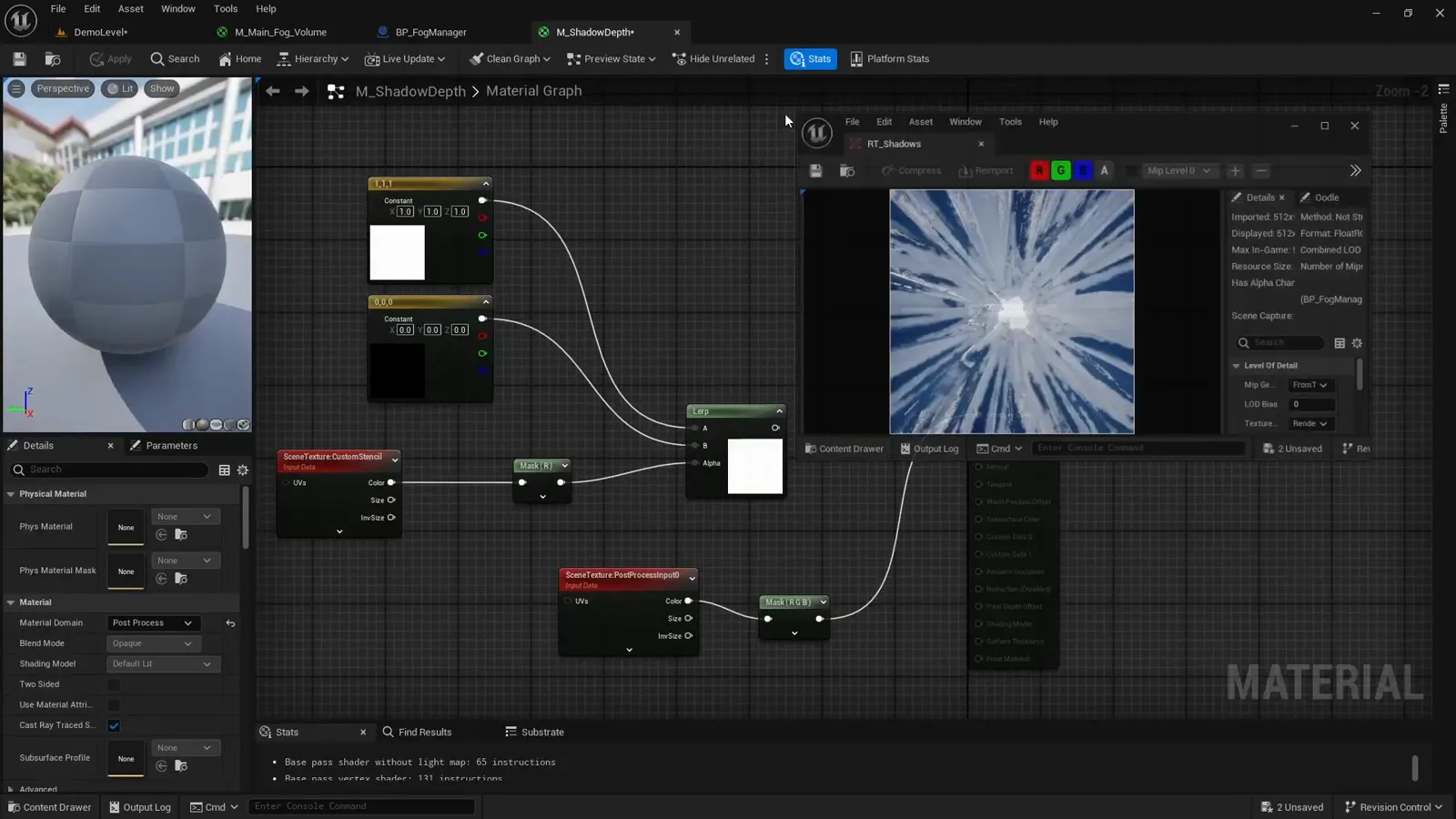
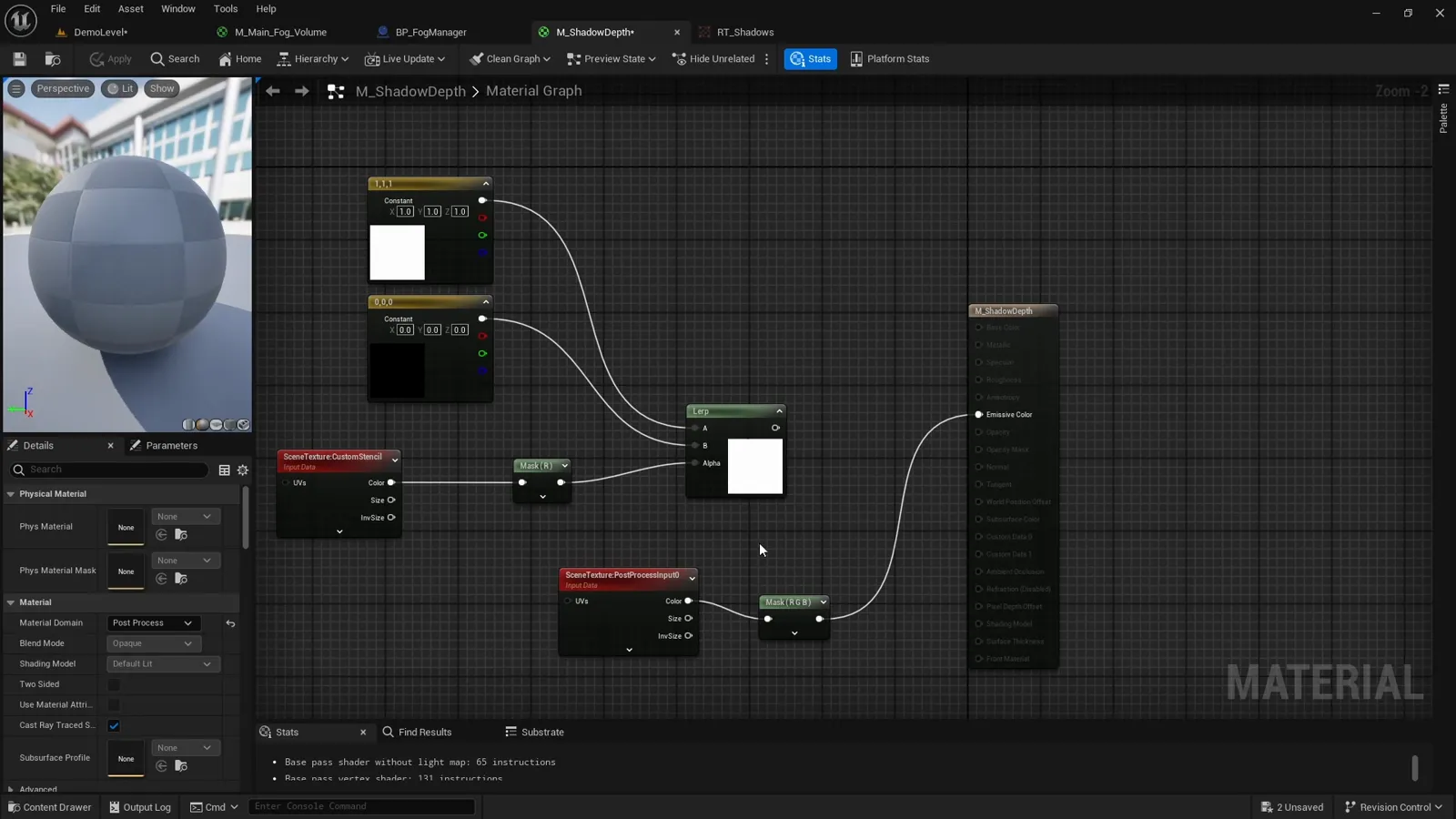
We convert that capture into a clean black-and-white shadow mask with a small post-process
material on the capture itself. Reading SceneTexture: CustomStencil, anything with a
stencil value of 1 (our occluders) is drawn black; everything else stays white:
float stencil = SceneTexture_CustomStencil(uv).r;
float shadow  = (stencil == 1) ? 0.0 : 1.0; // occluder pixels go black
Because the capture is taken from the player’s position looking down, the occluder
silhouettes naturally fall away from the player, which reads as shadows cast outward from
the viewer. The result is softened with a Kawase blur so the shadow edges are not hard
aliased steps, and stored in the shadow render target (RT_Map).
Running the game, instead of a light show we get a clean black-and-white mask where black is the shadow cast by nearby cliffs. It updates live as the character moves.
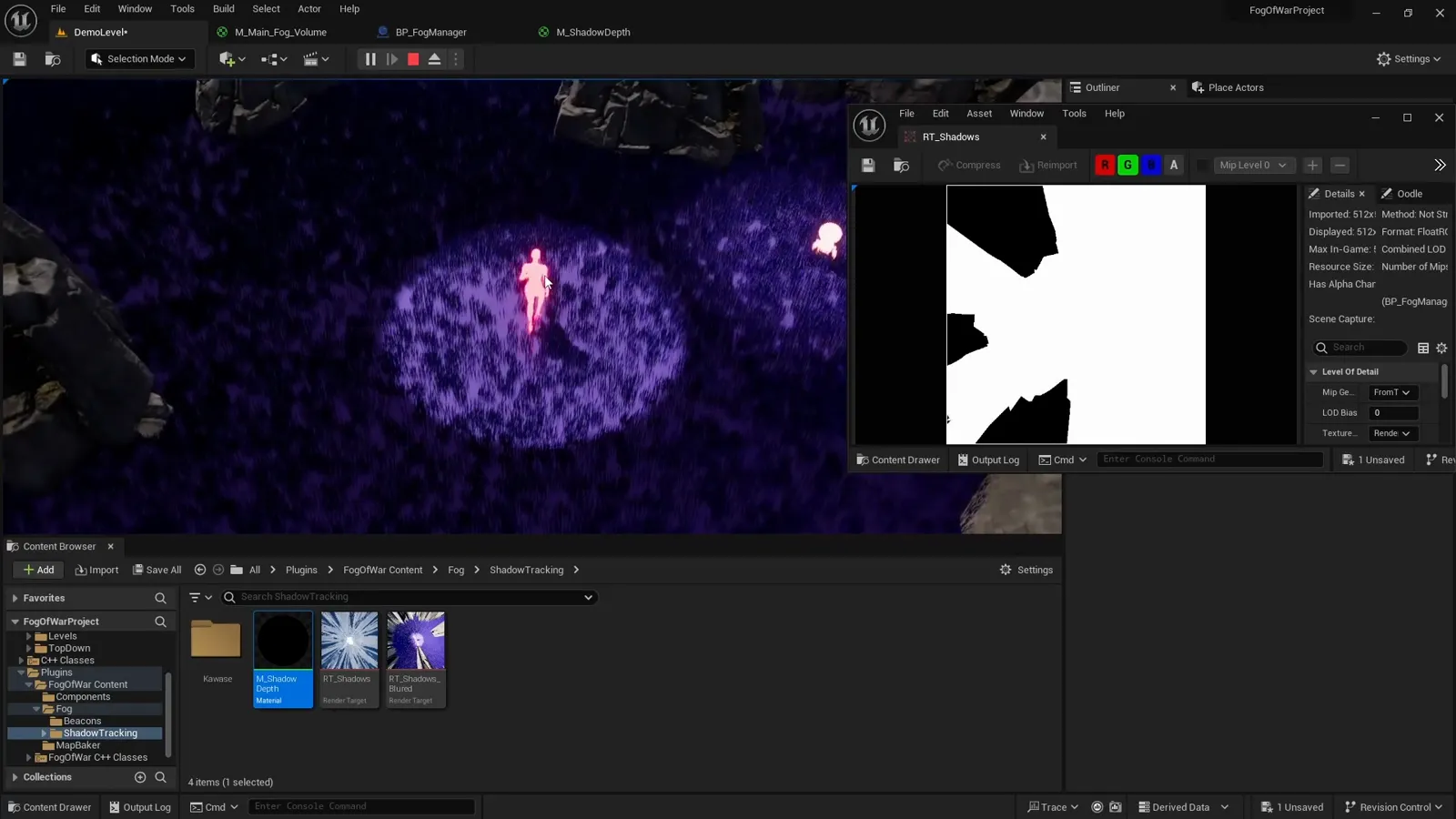
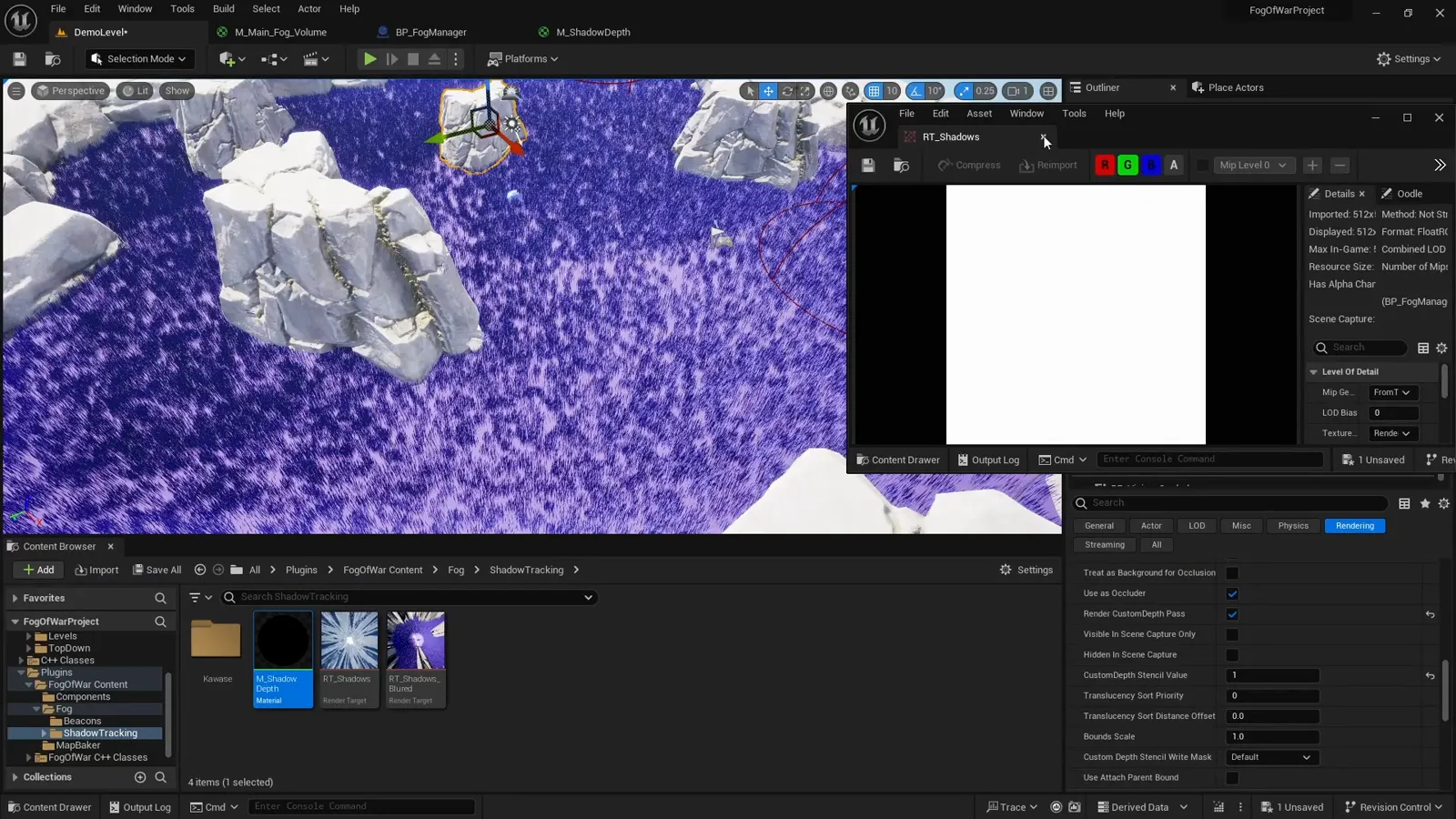
Testing this in multiplayer: the shadows bake to a single shared render target. In PIE under one process, both clients write to the same
RT_Shadows, so one client ends up driving both players’ shadows and it looks broken. To test it properly, run as two processes: Play, then Advanced Settings, then disable Run Under One Process.
Bringing the shadow mask back into the material
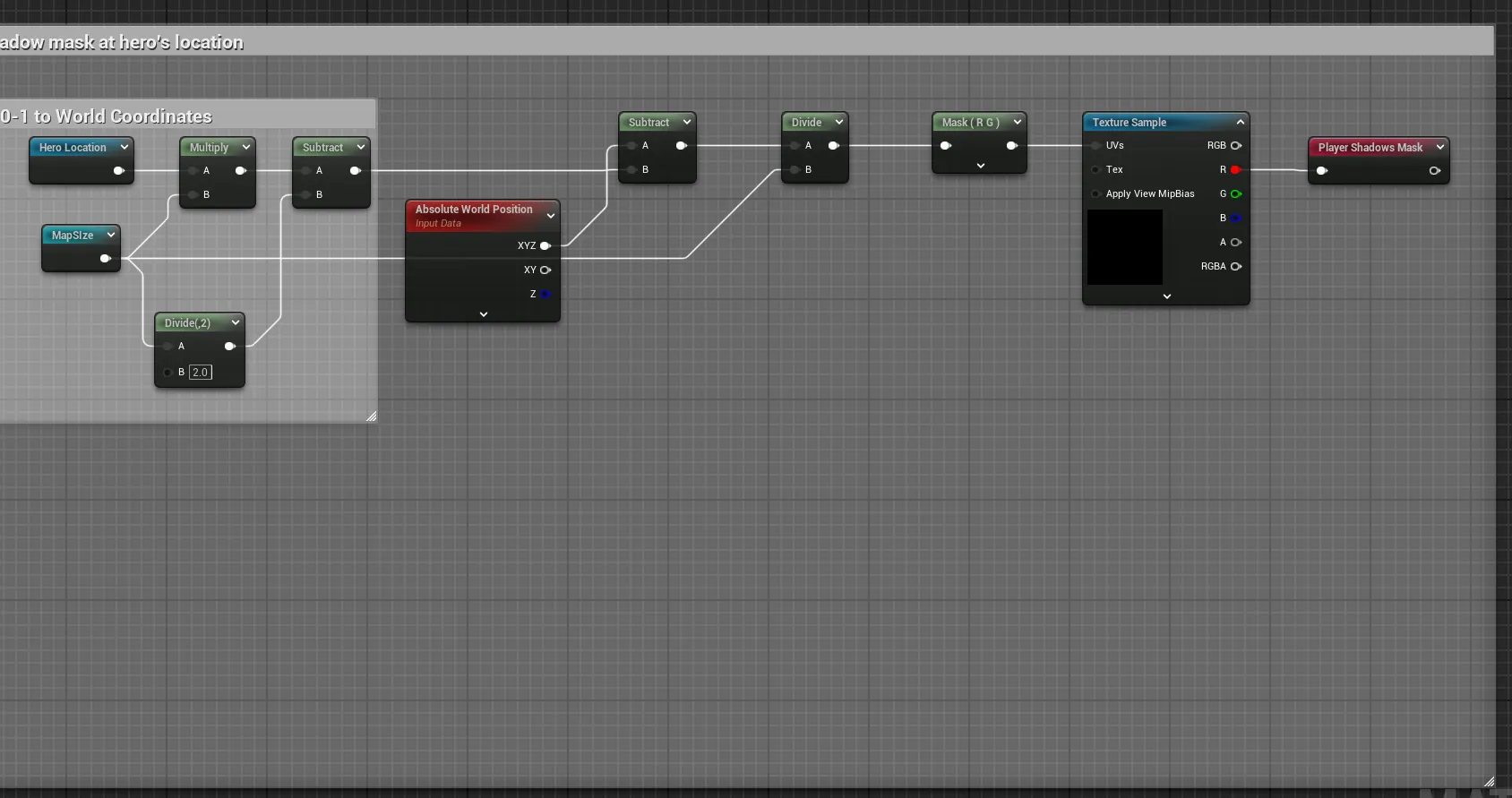
The shadow render target is centered on the player, not on the world, so we cannot reuse
the floor’s UV. Instead we take the pixel’s Absolute World Position, subtract the hero’s
world position (Hero Location * MapSize), and scale by the capture extent to land in the
render target’s 0 to 1 space. That maps each world pixel to the right spot in the
player-centered capture, so the shadow lines up with the geometry under the player.
In the combine, we invert the mask so the cliff shadows become white, then subtract them from the player’s reveal. Anywhere a cliff blocks the view, that slice of the lit circle is carved away:
// playerShadowsMask: dark where a cliff casts shadow (from the blurred capture RT)
float shadow = 1 - playerShadowsMask;            // invert: white where sight is blocked
float reveal = max(playerReveal, beaconReveal);  // from the other steps
float mask   = saturate(reveal - shadow);        // carve the shadowed wedge back out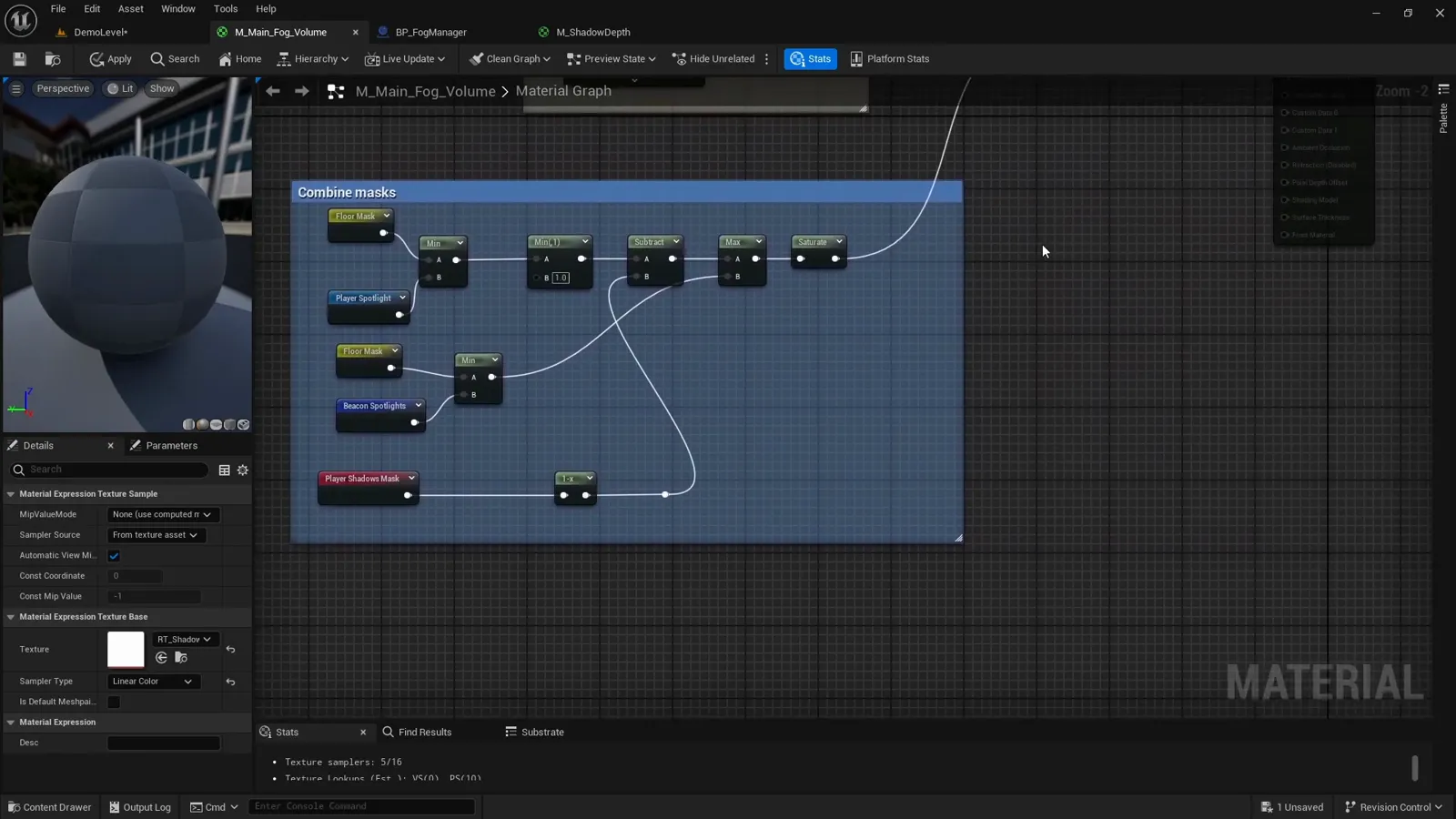
The result
Start the game and the spotlight follows the player, but tall cliffs now throw real shadows across the lit area, so the player can no longer see straight through them. The material darkens, reveals, and carves shadow, all from the one mask.
What’s next
You have the whole material. The remaining steps build the mask inputs it consumes. Next, see how the player’s position becomes the spotlight at the center of it: writing player location to the material.
If you would rather drop this into your project ready-made, the Multiplayer Fog of War plugin packages all of this up, replicated and performance-minded, for multiplayer and single-player top-down games.
Frequently asked questions
- How does the fog material decide what is visible?
- It builds one mask: the floor mask AND'd with the union of the player and beacon spotlights, minus the cliff shadows. It then lerps each pixel between a darkened and a lit version of the scene by that mask.
- Why do my custom stencils do nothing?
- The Custom Depth-Stencil Pass is off by default. In Project Settings set it to Enabled with Stencil, otherwise every CustomStencil read returns empty and occluders have no effect.
- Why is the shadow scene capture FOV 170 and not 180?
- 180 misbehaves in practice; 170 is wide enough to capture the player's surroundings from above, which is the vantage point used to work out what cliffs block.
- Why do my cliff shadows look wrong in PIE?
- The shadows bake to one shared render target. Under a single PIE process both clients write to the same target. Run as two processes (disable Run Under One Process) to test them correctly.