Top-Down Fog of War in Unreal Engine: How It Works
An introduction to top-down fog of war in Unreal Engine: why it is a screen-space post-process and not GPU visibility work, and the two independent layers, the local visual reveal and the server-authoritative actor hiding, this guide separates.
This is the first step of the Top-Down Fog of War in Unreal Engine guide. Before any nodes, it is worth being clear about what we are building and, just as important, what we are not.
The two layers
People conflate these, so it is worth separating them up front. A top-down fog of war is really two independent systems:
- The visual reveal: darkening the screen and lifting that darkness around the player. This is pure post-process and runs locally on each client. Nothing about it needs the server, because it only changes what the local player sees.
- Hiding actors you have no vision of (enemies behind a wall). That is a separate, server-authoritative line-of-sight system and has nothing to do with the material.
This guide is the visual reveal. The enemy-hiding layer is its own topic, and because the reveal is local, there is nothing here to replicate: the effect looks identical in single player and multiplayer.
It is a post-process, not GPU visibility work
The lit circle that follows your hero looks like it needs expensive per-unit visibility math. It does not. The entire reveal is one screen-space post-process material on an unbound volume. The material darkens the whole scene, then lerps the lit scene back in wherever a single black-and-white mask is white:
// SceneColor = SceneTexture:PostProcessInput0
float3 dark = SceneColor * Darkness;     // Darkness param, e.g. (0.146, 0.146, 0.146)
EmissiveColor = lerp(dark, SceneColor, mask); // mask 1 = fully visible, 0 = fogged
So the only real question in the whole guide is how we build mask: white where the
player can currently see, black everywhere else. Every later step produces one input to
that mask.
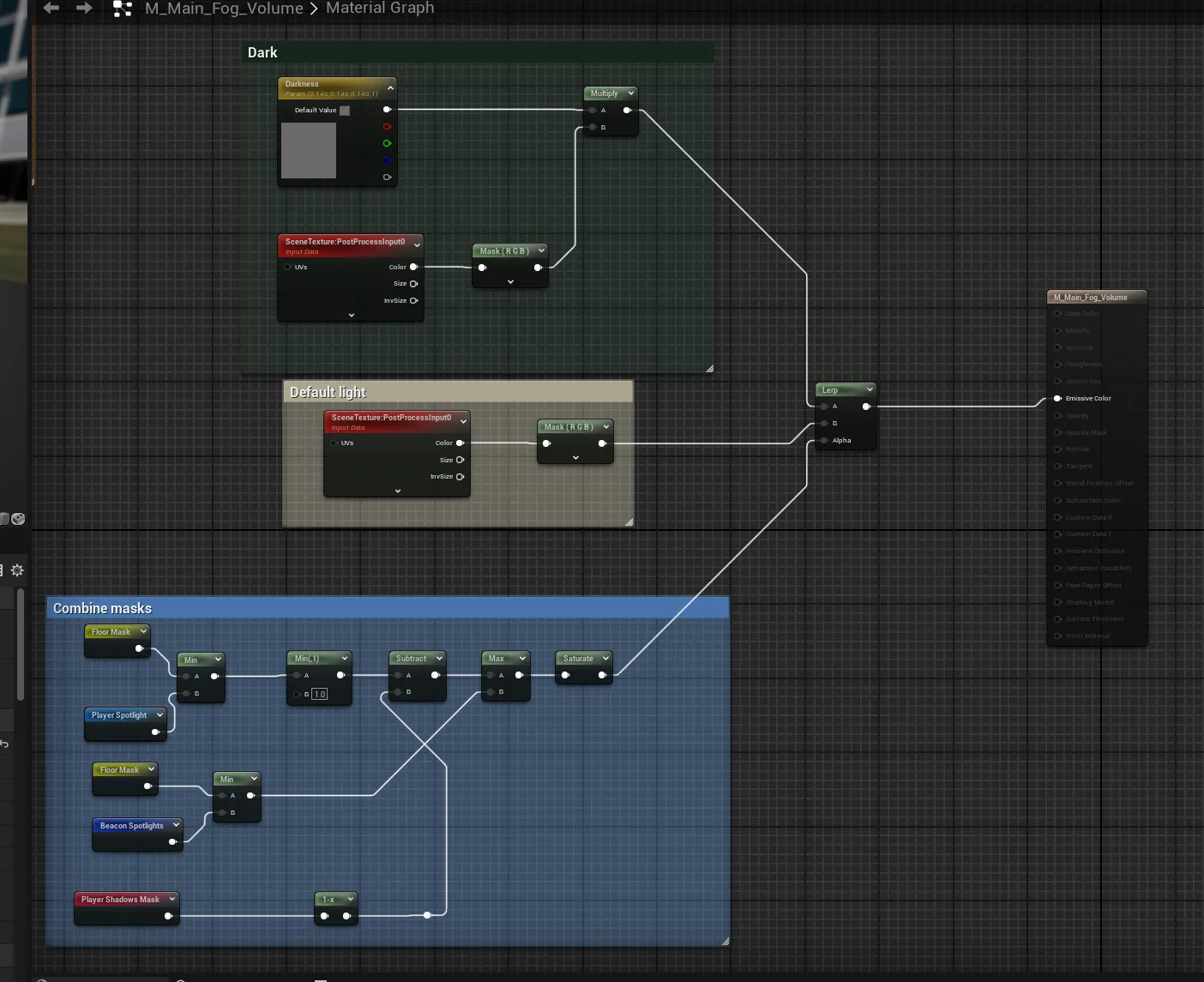
Roughly, that mask is the floor (walkable ground) intersected with the union of the
player spotlight and any beacons, minus the cliff shadows. The rest of the
guide builds each of those pieces and the actor that drives them.
What you need
This is intermediate Unreal Engine: you should be comfortable reading a material graph, writing a little C++, and working with render targets. It targets UE5 and has no third-party dependencies; the entire effect is one post-process material plus a handful of parameters pushed in from code.
Next, meet the pieces: the actors and components that make up the system, and what each one is for. If you would rather drop the finished system into your project, the Multiplayer Fog of War plugin packages all of it, replicated and performance-minded, for top-down games.
Frequently asked questions
- Is Unreal fog of war a post-process or a separate render pass?
- It is a single post-process material on an unbound volume. The material darkens the whole scene and lerps the lit scene back wherever a combined black-and-white mask says the player can currently see.
- Does the visual reveal need to be replicated in multiplayer?
- No. It runs locally on each client and only changes what that player sees, so it costs nothing to replicate. The separate enemy-hiding layer is the part that is server-authoritative.
- What do I need to follow this guide?
- Intermediate Unreal Engine: comfort reading a material graph, a little C++, and render targets. It targets UE5 and has no third-party dependencies.