C++ Syntax Highlighting in a Slate Text Editor
How to syntax-highlight C++ inside Unreal's Slate text framework: a two-state tokenizer feeding a marshaller that recovers semantic colors, the look-ahead heuristic that tells a class from a function call without a parser, color presets, and highlighting every occurrence of the word under the cursor.
Syntax highlighting looks like it should be hard, and in Unreal it is mostly already done for you. Slate ships the same text-highlighting machinery the engine uses for its shader and Python editors; you supply two small pieces and inherit the rest. This article walks through those pieces for C++, using the AI Node Code Editor (Quick Code Editor on FAB) as the example. It is one of six articles in Building an AI Code Editor Inside Unreal Engine.
Slate’s text pipeline
The flow, top to bottom, is:
ISyntaxTokenizersplits raw text into tokens, line by line.- A marshaller (
FSyntaxHighlighterTextLayoutMarshaller) bridges the model string and a visualFTextLayout, calling the tokenizer and then turning its tokens into styled runs. FTextLayoutowns the laid-out lines and runs and does the painting.FSlateTextRunis one contiguous styled span, oneFTextBlockStyle(font and color).
To highlight C++ you subclass exactly two of these: the tokenizer (to add C++ rules) and the marshaller (to map tokens to colors). The single most important thing to understand is the division of labor between them.
The key insight: a two-state tokenizer
Here is the part that surprises people. A Slate FToken is only ever one of two types:
Syntax or Literal. It does not carry a category like “keyword” or “string”. The
tokenizer’s only job is to answer “is this run of characters special, or plain text?” That
is it.
So the tokenizer for C++ recognizes the shapes of things, strings, comments, numbers,
operators, identifiers, and emits each as a Syntax token (or leaves it Literal). All the
semantic richness, keyword vs type vs function vs class, is recovered later, in the
marshaller. A two-state lexer plus a smart styler is far simpler than a fully classifying
lexer, and it is enough for good highlighting.
The tokenizer itself is hand-written character scanning, not regex. It keeps a few TSets
of known words (C++ keywords, Unreal macros like UCLASS and UPROPERTY, engine typedefs
like int32 and FString) and walks each line trying matches in priority order:
continuation of an open block comment, string literal, char literal, block-comment start,
operators, then identifiers and numbers.
Two details are worth lifting. First, strings track escapes so \" does not end the
string early:
bool bEscaped = false;
for (; Pos < End; ++Pos)
{
    if (Text[Pos] == TEXT('\\') && !bEscaped) { bEscaped = true; continue; }
    if (Text[Pos] == TEXT('"')  && !bEscaped) break;   // real closing quote
    bEscaped = false;
}
Second, block comments carry state across lines, which is why a tokenizer is stateful,
not a pure function. A /* with no */ on the same line sets a member flag, and the next
line starts inside a comment:
if (bInMultilineComment)
{
    int32 CloseIdx = INDEX_NONE;
    if (Line.FindChar(TEXT('*'), CloseIdx) /* followed by '/' */)
        bInMultilineComment = false;       // comment ends on this line
    // emit the spanned text as one Syntax token either way
}
There is also a word-boundary check on keywords so int does not light up inside
integer: a candidate only counts as a keyword if the next character is not an identifier
character. Identifiers that are not keywords or known types fall through as Literal,
deliberately, because classifying them needs context the marshaller has.
The marshaller recovers the colors
The marshaller’s ParseTokens walks the tokenized lines and assigns each token a colored
run. For a Syntax token it checks, in order: is it a comment, a preprocessor directive
(starts with #), a string (starts with a quote), a number (starts with a digit), a known
Unreal type, a keyword, an operator. For a Literal token that starts with a letter, it
does the clever bit.
Class vs function without a parser
How do you tell Foo the class from foo() the call from bar the variable, with no AST?
A small look-ahead. The marshaller peeks at the next tokens and decides:
// LiteralToken starts with a letter and is not a known keyword/type.
const FString Next = PeekNextTokens(/*count*/ 2);

if (Next.StartsWith(TEXT("::")))
    Style = ClassNameStyle;        // Foo::  -> class or namespace
else if (Next.Contains(TEXT("(")) && !PrecededBy(TEXT("class")) && !PrecededBy(TEXT("struct")))
    Style = FunctionNameStyle;     // foo(   -> function call/definition
else
    Style = NormalStyle;           // plain identifier
Name:: means a class or namespace; Name( means a function; anything else is a plain
identifier. It is a heuristic, it can be fooled, but it is fast, needs no parser, and is
right the overwhelming majority of the time. That is the trade a syntax highlighter makes:
approximate classification that looks right, not a compiler.
Each token then becomes a run with the chosen style. When the text changes, the base marshaller re-tokenizes and rebuilds the runs, so every edit recolors the whole buffer (simple, and fast enough at editor scale).
Colors, presets and live updates
The per-token colors are just settings: FLinearColor properties for Text, Keywords,
Comments, Strings, Numbers, Types, Function Names and Class Names, plus a word-highlight
color and tab colors.
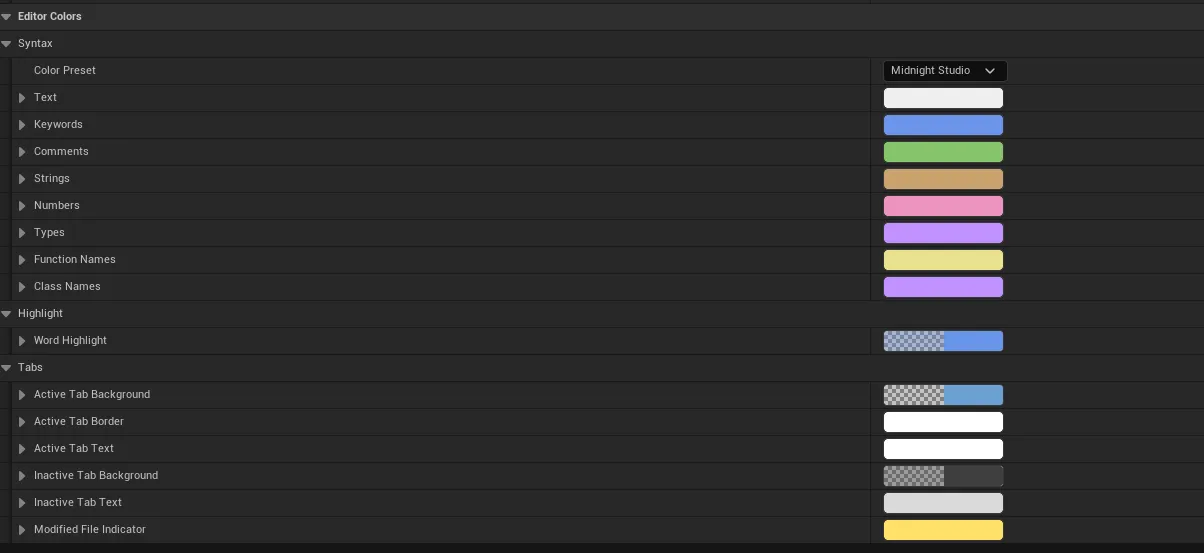
A preset is nothing more than a function that bulk-assigns all of those colors:
case EQCEColorPreset::MidnightStudio:
    KeywordColor  = FLinearColor(0.15f,  0.30f, 0.83f, 1.f);   // blue
    CommentColor  = FLinearColor(0.235f, 0.55f, 0.15f, 1.f);   // green
    StringColor   = FLinearColor(0.584f, 0.36f, 0.15f, 1.f);   // orange-tan
    NumberColor   = FLinearColor(0.847f, 0.30f, 0.53f, 1.f);   // pink
    TypeColor     = FLinearColor(0.533f, 0.28f, 1.f,   1.f);   // purple
    FunctionColor = FLinearColor(0.82f,  0.76f, 0.28f, 1.f);   // gold
    // ...
    break;
Picking a preset overwrites the individual colors; editing one swatch afterwards is what a
“Custom” theme is. The marshaller reads these colors when it builds its run styles, and it
listens to a change delegate so editing a color in Project Settings recolors the open editor
on the next parse. That live link is the same PostEditChangeProperty pattern covered in
the settings article.
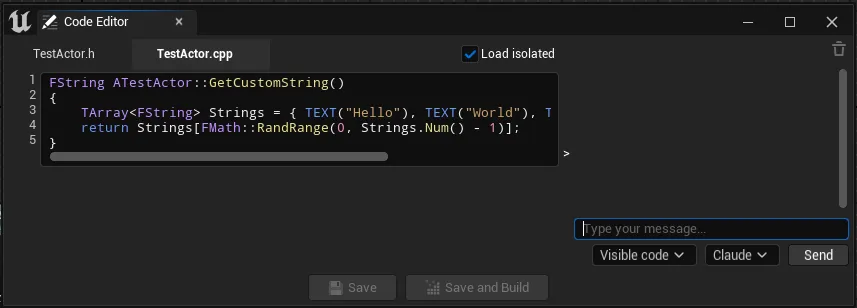
The result is the colored C++ you actually edit in:
Two extra touches
A couple of details round it out and are good illustrations of where Slate text work actually happens.
Tabs are a layout problem, not a text one. A tab character has no inherent width, so a
custom run overrides Measure to report SpaceWidth * TabSpaceCount per tab, using the
font measure service. Subclassing the run purely to size tabs is a clean example of where
geometry lives in Slate text.
Highlighting every occurrence of a word is a separate painter, not a run. When the cursor lands on a symbol, the layout adds a line-highlight behind every other occurrence of that word (whole-word matched, same boundary check as the tokenizer), drawn at a negative Z-order so the box sits behind the text:
// Z-order -9 so the highlight paints behind the glyphs.
Layout->AddLineHighlight(FTextLineHighlight(LineIndex, Range, /*ZOrder*/ -9, Highlighter));
That uses the configurable Word Highlight color from the same settings page.
What to take away
- Reuse Slate’s
ISyntaxTokenizerand marshaller; you only write the C++ lexing rules and the token-to-color mapping. - The tokenizer is two-state (syntax vs literal). Recover semantic categories in the
marshaller, including the
Name::/Name(look-ahead that separates classes from function calls without a parser. - A tokenizer is stateful (block comments span lines) and uses word boundaries so keywords do not match inside larger identifiers.
- Themes are just bulk color assignment; a change delegate gives you live recoloring.
Several of these pieces, the word-boundary scanning, the brace matching, reappear when the editor parses C++ to find a function’s declaration and definition. The full series is Building an AI Code Editor Inside Unreal Engine; the finished plugin is AI Node Code Editor on FAB.
Frequently asked questions
- Does Unreal have a built-in syntax highlighter you can reuse?
- Yes. Slate ships ISyntaxTokenizer and FSyntaxHighlighterTextLayoutMarshaller, the same machinery used for the engine's shader and Python editors. You subclass the tokenizer to add C++ lexing rules and the marshaller to map tokens to colors; the text layout and runs come for free.
- How do you tell a class name from a function call without a full parser?
- With a small look-ahead. After an identifier the highlighter peeks at the next tokens: if a :: follows, it is a class or namespace; if a ( follows (and it is not preceded by class or struct), it is a function; otherwise it is a plain identifier. It is a heuristic, but it is fast and right almost always.
- How does a tokenizer handle multi-line block comments?
- It carries state across lines. The tokenizer is not a pure function: a member flag like bInMultilineComment is set when a /* opens without a closing */ on the same line, so the next line knows it starts inside a comment until it finds the close.
- How do color themes work?
- A preset is just a function that bulk-assigns every per-token color. Choosing a preset overwrites the individual color settings; editing one color afterwards puts you on a custom theme. The marshaller reads those colors when it builds its run styles, and a change delegate makes the open editor recolor live.