Code Completion in an Unreal Editor: Dictionary, Reflection and LLM Context
Two completion systems compared: an instant offline dropdown backed by a trie and Unreal's reflection system, and an LLM inline suggestion. The focus is the token-economy context ladder, current line, nearby lines, code above the cursor, the whole function, and why you never send the whole class.
There are two completely different ways to complete code, and a good editor ships both because they solve different problems. One is instant, offline and free but only knows what it can see. The other understands what you are trying to do but costs tokens on every keystroke you ask it about. This article compares them, then digs into the part that actually matters for the LLM path: how much code you send, and why. It uses the AI Node Code Editor (Quick Code Editor on FAB) as the example and is one of six articles in Building an AI Code Editor Inside Unreal Engine.
System one: the offline dropdown
The first system is a classic autocomplete dropdown with no network and no cost. It runs a small engine that fans a request out to a set of providers, each implementing one interface:
class ICompletionProvider
{
public:
    virtual TArray<FCompletionItem> GetCompletions(const FCompletionContext& Context) = 0;
    virtual int32 GetPriority() const = 0;
    virtual bool CanHandleContext(const FCompletionContext& Context) const = 0;
};
The engine calls every provider that can handle the current context, merges the results, dedups by display text, and sorts by score. Two providers do the work.
The keyword provider: a trie
The first provider matches a curated dictionary of C++ keywords and Unreal macros using a trie (prefix tree). Each node holds its children by character and the words that end there:
struct FTrieNode
{
    TMap<TCHAR, TSharedPtr<FTrieNode>> Children;
    TArray<FString> Completions;   // full words ending at this node
    bool bIsEndOfWord = false;
};
Insertion walks the word character by character (lowercased, so lookups are case-insensitive), and lookup navigates to the prefix node then collects every word in that subtree. It is O(prefix length) to locate, then O(matches) to gather, the textbook autocomplete structure. The catch is that it only knows words that were inserted, so it is exactly as good as its dictionary and no smarter.
The reflection provider: the engine knows your types
The second provider is the clever one. When you type MyActor-> or FString::,
it resolves the type to the left of the operator and lists its real members straight
from Unreal’s reflection system:
for (TFieldIterator<UFunction> It(ResolvedClass, EFieldIteratorFlags::ExcludeSuper); It; ++It)
{
    UFunction* Function = *It;
    // filter by access: '::' shows static functions, '->' and '.' show instance functions
    Items.Add(MakeFunctionCompletion(Function));   // builds "Name(Type Param)" from FProperty params
}
It walks UFunctions and FPropertys with TFieldIterator, respects the access operator
(:: lists statics, -> and . list instance members and public properties), and even
demotes inherited members so the type’s own members rank first. Because it reads the live
reflection data, it is correct in a way a static dictionary can never be, no list to
maintain, it just knows.
The tradeoff for the whole offline system: it is instant, free, deterministic and works with no key, but it has zero sense of intent. It can tell you what members exist; it cannot write the loop you were about to write. That is the other system’s job.
System two: LLM inline suggestion
The second system sends your code to an LLM and inserts what it returns as a highlighted suggestion you accept or reject. Triggered with a shortcut, it pops a small prompt where you can add a one-line intent and choose how it works:
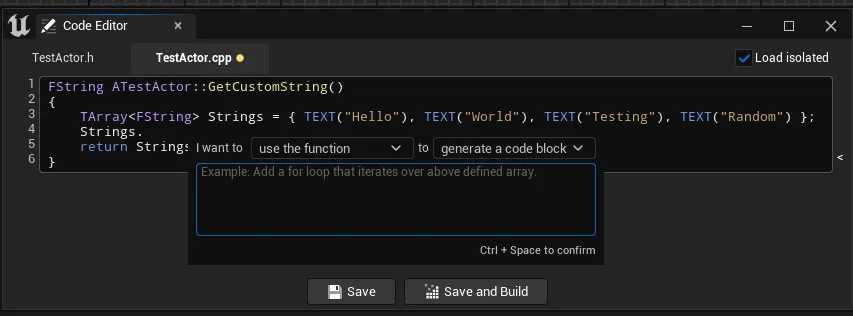
The completion itself reuses the same provider-agnostic AI client described in
the AI assistant article. The prompt embeds
the language, the requested scope, an optional intent (“TODO”), and the code with an
<ins></ins> marker showing exactly where the completion goes:
Complete the following cpp code. The <ins></ins> marker shows where to insert
the completion. Only return the completion text, no explanations. Add one or more
lines. TODO: iterate over the array

```cpp
TArray<FString> Strings = { TEXT("Hello"), TEXT("World") };
<ins></ins>
The accept/reject is a neat trick: the returned text is inserted at the cursor and then
**selected**, so it reads as a highlighted suggestion. Accepting collapses the selection;
rejecting deletes it. There is no separate ghost-render layer, just insert-and-select.
## The part that matters: the context ladder
Everything above is setup. The decision that determines whether LLM completion is cheap or
wasteful is **how much code you send as context**. More context is not free, every token
costs money and latency, and beyond a point it does not even help, because the model anchors
on irrelevant code. So the editor exposes a ladder of context strategies, and the popup
lets you pick per request:

From cheapest to richest, here is what each one actually sends. Every strategy inserts the
`<ins></ins>` marker at the cursor so the model knows the fill point.
**1. Current line.** Only the text from the start of the current line up to the cursor. The
cheapest possible context; the model has almost nothing to go on, but for finishing a
statement that is fine.
**2. Nearby lines (N lines above cursor).** A fixed number of preceding lines, with blank
lines skipped so the budget is spent on actual code:
```cpp
// Walk backwards from the cursor collecting non-blank lines until we have N of them,
// then re-emit them top to bottom with <ins></ins> at the cursor column.
int32 Collected = 0;
for (int32 Line = CursorLine; Line >= 0 && Collected < MaxLines; --Line)
if (!IsBlank(Lines[Line])) { Selected.Insert(Lines[Line], 0); ++Collected; }The token cost is hard-capped by N (default 5), which makes this the predictable workhorse.
3. Code above (function up to the cursor). The enclosing function from its signature down to the cursor, but nothing after. The editor finds the function with a regex for C++ definitions, brace-matches to confirm the cursor is inside it, and sends only the prefix:
// FunctionStart .. Cursor, then the marker. The model sees the signature and everything
// written so far, but not the code below the cursor.
Context = SourceCode.Mid(FunctionStart, Cursor - FunctionStart) + TEXT("<ins></ins>");
This is the sweet spot for “continue what I am writing”: full local context, no wasted tokens on code the model should be replacing anyway.
4. The whole function. The entire enclosing function, with the marker at the cursor’s position inside it, so the model gets both the code before and after the insertion point. This is the fill-in-the-middle case and the most expensive of the function strategies.
What is deliberately not on the ladder is “the whole class” or “the whole file”. In a header the richest option is nearby lines; in a cpp it is the whole function. Shipping the entire class would multiply the token cost for usually no gain. The absence of that option is the design choice, not an oversight.
Header context is different from cpp context
The ladder is also split by file type, which is itself a token saving. A header has no
function bodies, so sending “the whole function” there is meaningless; the header path only
offers current-line and nearby-lines. The implementation path unlocks the function
strategies. The editor knows which file you are in and offers only the strategies that make
sense, so you never waste a request asking for a function body from a .h.
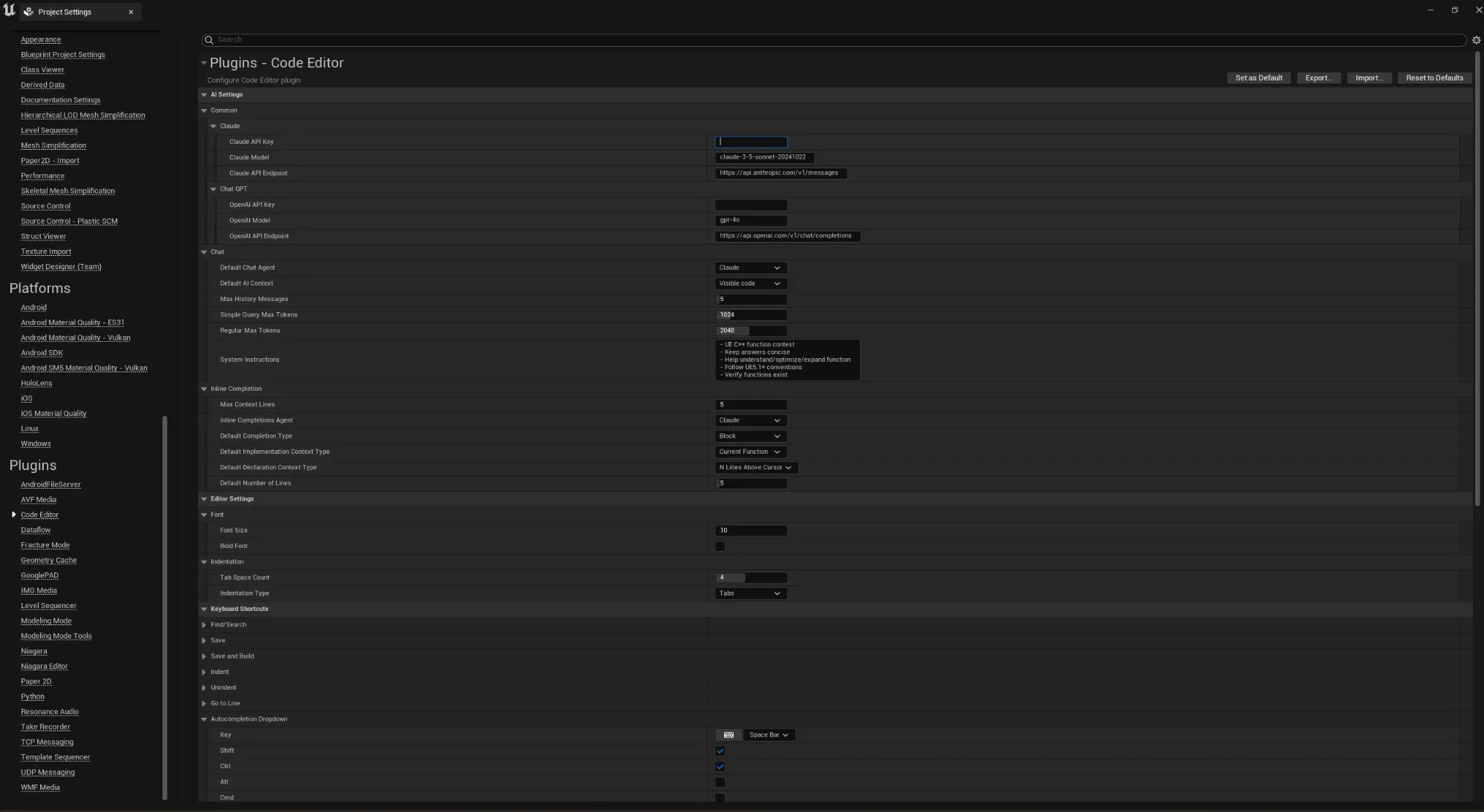
You can set sensible defaults for both in settings, separately for declaration and implementation files, alongside the line-vs-block default and the line count:
Line vs block: capping the output
One more dial, separate from context: how much the model is asked to generate. This does not change the context at all, only the instruction appended to the prompt:
- Line appends “Only finish current line.” Cheaper output, good for completing a statement.
- Block appends “Add one or more lines.” The default, for when you want real code back.
So a request is two independent choices: the context (how much you send) and the scope (how much you ask back). Tuning both is how you keep an LLM completion feature from running up a bill.
Chat context follows the same logic
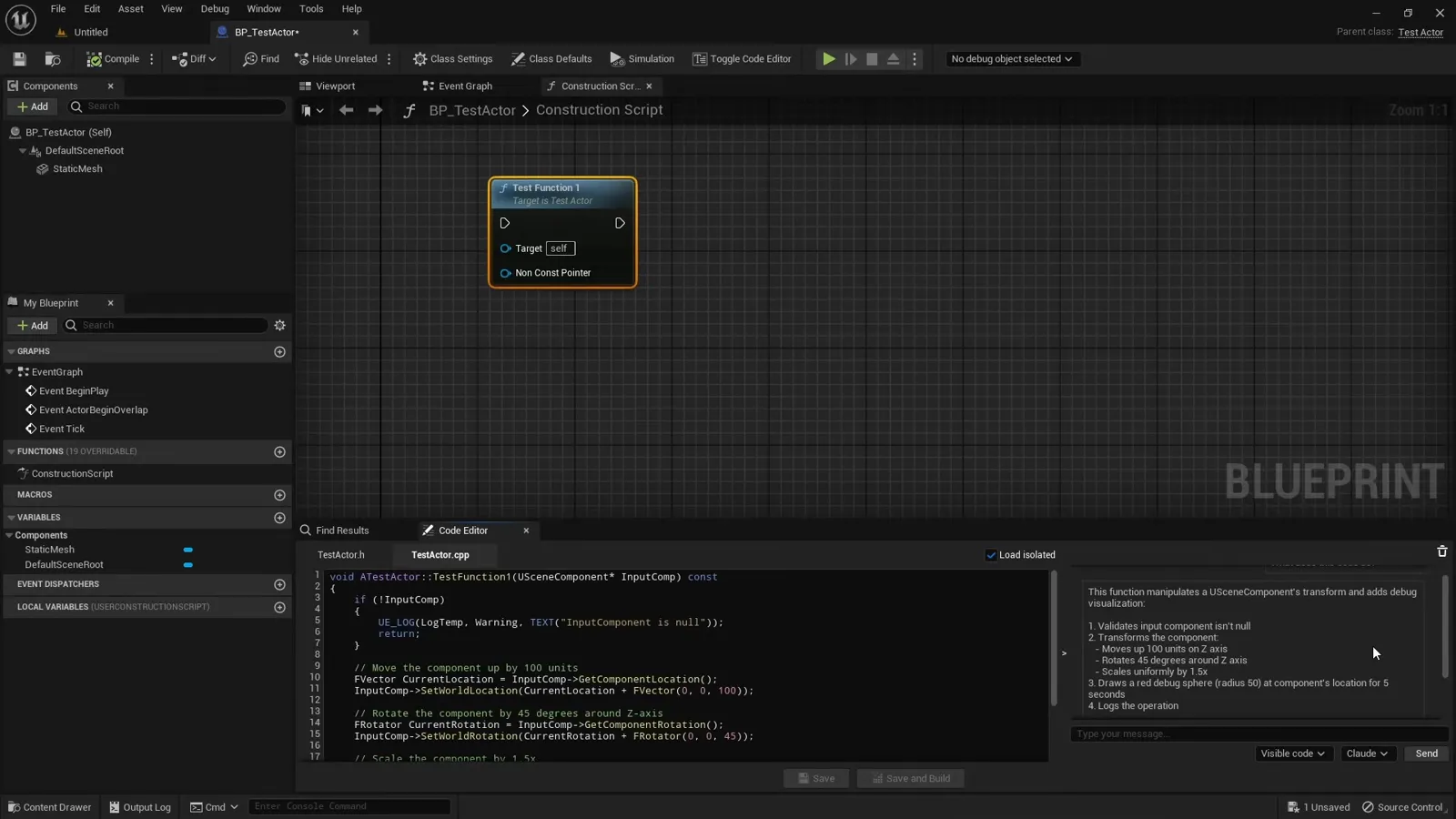
The chat assistant has the same instinct at a coarser grain: you choose between sending the visible code or just your selection. Selecting first and asking about that block is the cheap, precise option, the same “send the smallest useful slice” principle that drives the inline ladder.
What to take away
- Ship both kinds of completion. The offline dropdown (trie + reflection) is instant, free and correct about what exists; the LLM is the only one that understands intent.
- For the LLM, the context slice is the whole game. Offer a ladder: current line, nearby lines, code above the cursor, whole function, and pick the least that works.
- Do not send the whole class. Split context by file type so a header never ships a function body, and bound the line count.
- Separate context (input size) from scope (output size); line-vs-block caps how much the model writes.
The slicing relies on knowing where a function starts and ends, which is the C++ parsing covered next. The full series is Building an AI Code Editor Inside Unreal Engine, and the finished plugin is AI Node Code Editor on FAB.
Frequently asked questions
- What is the cheapest way to complete code in an editor?
- A local dictionary plus reflection. A trie does prefix matching on a keyword list, and Unreal's reflection (TFieldIterator over UFunction and FProperty) lists a resolved type's real members. It is instant, offline, free and deterministic, but it only knows symbols it can see, it has no sense of intent.
- How does an LLM code completion keep token costs down?
- By sending the smallest code slice that still yields a useful answer. Instead of the whole file, it sends one of: the current line, a fixed number of nearby lines, the code from the function start up to the cursor, or the whole enclosing function. Each step up the ladder costs more tokens, so you pick the least that works.
- Why not just send the whole class or file to the LLM?
- Tokens cost money and latency, and more context is not automatically better, the model can anchor on irrelevant code. The whole-class slice is deliberately not offered. The richest context in a header is a few lines around the cursor; the richest in a cpp is the enclosing function.
- What is the difference between line and block completion?
- It changes how much the model is asked to generate, not what context it gets. Line completion appends an instruction to finish only the current line; block completion asks for one or more lines. Block is the default; line is cheaper output when you only want to finish a statement.