Assignments and Gameplay Tags: One Gather Job Into Many
How a data asset of Gameplay Tag pairs turns a single resource-gathering loop into wood, stone, and anything else in Unreal Engine. Each assignment maps an order tag to a resource tag, a carried actor, a Behavior Tree, a home marker, and an attach socket.
Nothing in the gather loop is hard-coded to “wood”. A worker harvests whatever its current order points at, and orders are just rows in a data asset. This card is about that data asset, the contract that turns one loop into many jobs. It belongs to Resource Gathering AI in Unreal Engine, and follows on from the Gatherer component, which reads it.
One assignment is a small contract
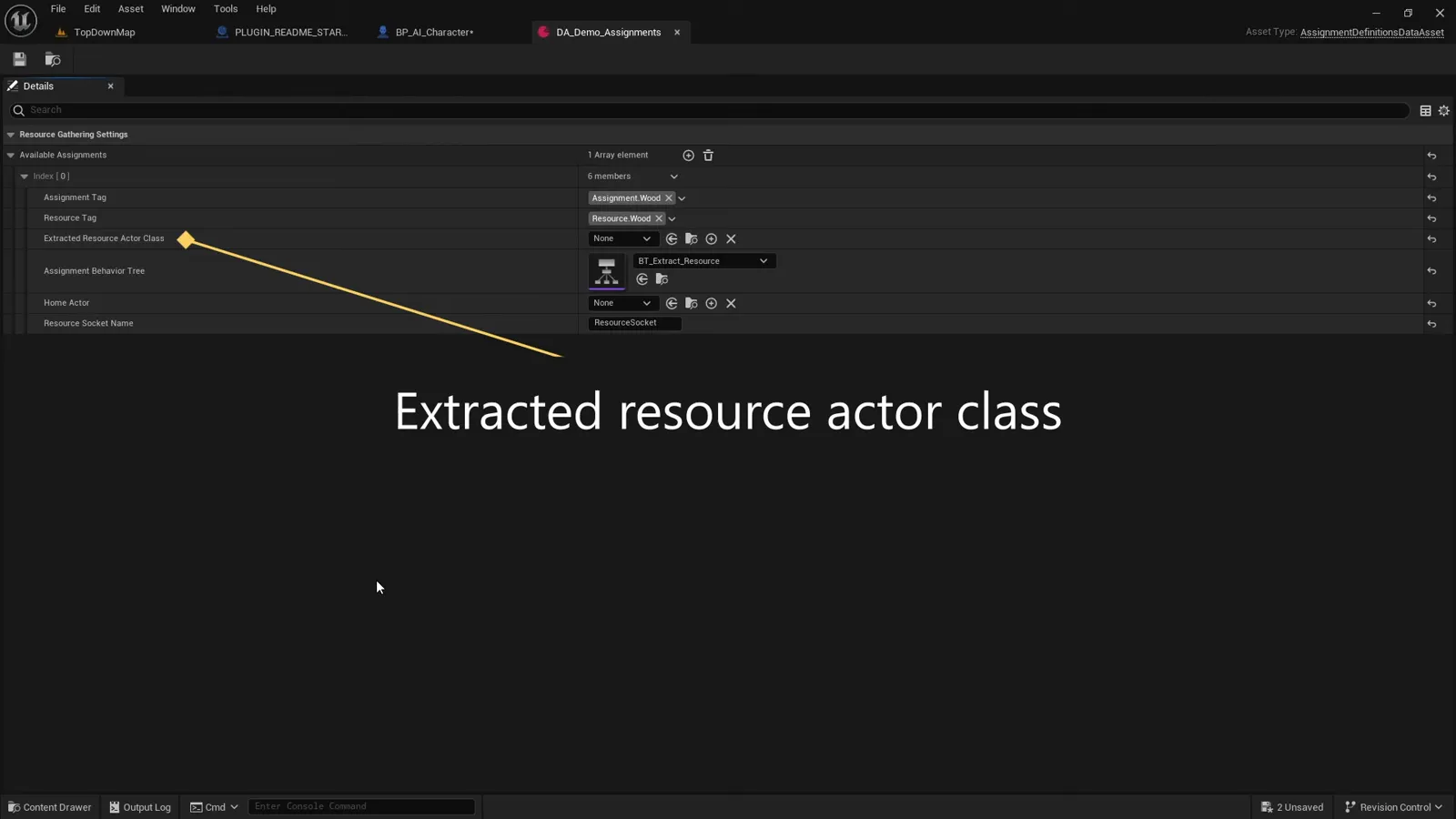
The data asset is a UDataAsset holding an array of FAssignmentDefinition structs. Each
struct describes one kind of job:
USTRUCT(BlueprintType)
struct FAssignmentDefinition
{
    GENERATED_BODY()

    UPROPERTY(EditDefaultsOnly, BlueprintReadOnly, Category = "Assignment")
    FGameplayTag AssignmentTag;        // the order the player issues, e.g. Assignment.Wood

    UPROPERTY(EditDefaultsOnly, BlueprintReadOnly, Category = "Assignment")
    FGameplayTag ResourceTag;          // what the worker searches for, e.g. Resource.Wood

    UPROPERTY(EditDefaultsOnly, BlueprintReadOnly, Category = "Assignment")
    TSubclassOf<AActor> ExtractedResourceActorClass;   // what it carries home

    UPROPERTY(EditDefaultsOnly, BlueprintReadOnly, Category = "Assignment")
    UBehaviorTree* AssignmentBehaviorTree;             // how it behaves

    UPROPERTY(EditDefaultsOnly, Category = "Assignment")
    TSubclassOf<AActor> HomeActor;     // optional marker spawned at the drop point

    UPROPERTY(EditDefaultsOnly, Category = "Assignment")
    FName ResourceSocketName;          // skeleton socket the carried item snaps to
};
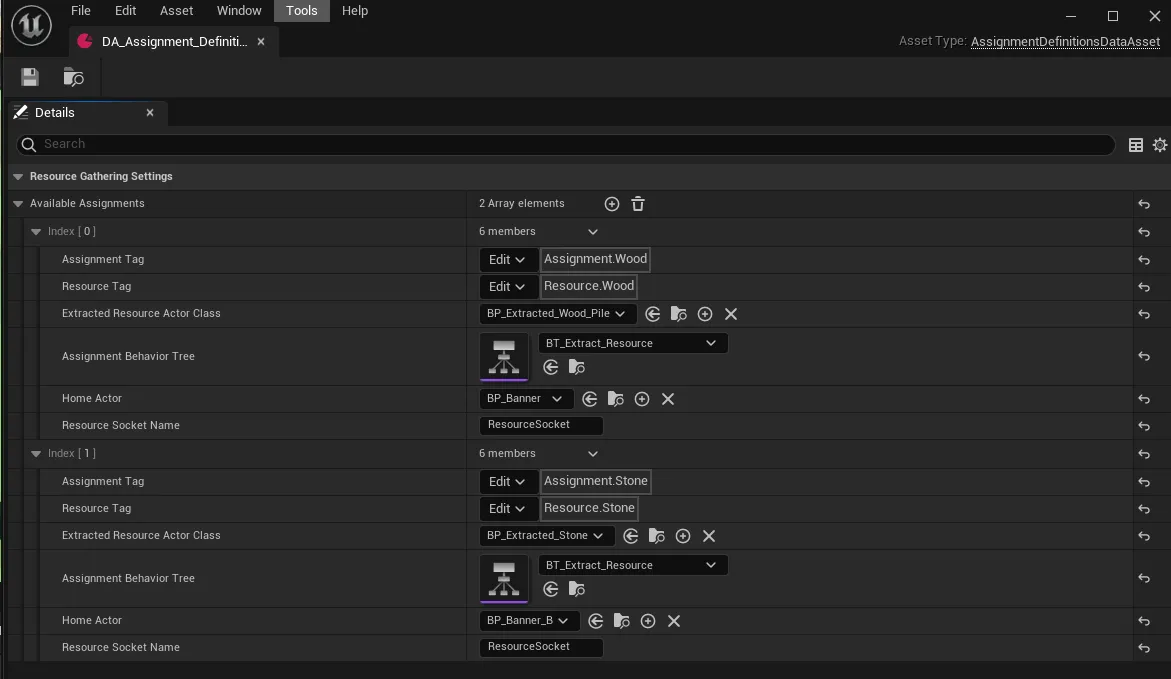
Six fields, and between them they cover the entire job: the order tag that starts it, the resource tag that finds the target, the actor that gets carried, the tree that runs, an optional banner or flag to mark home, and the socket the haul rides on.
Tags are the matchmaker
The two Gameplay Tags are the heart of it. The Assignment Tag is what the player passes
to TryBeginAssignment; the Resource Tag is what the worker’s search compares against
every harvestable actor in range. The lookup is an exact-tag match:
for (const FAssignmentDefinition& Assignment : AvailableAssignments)
{
    if (Assignment.AssignmentTag.MatchesTagExact(AssignmentTag))
    {
        OutFoundAssignmentDefinition = Assignment;
        return true;
    }
}
MatchesTagExact means Assignment.Wood does not also match Assignment.Wood.Oak; the
tags you issue and the tags you store have to be the same. Once the order resolves, the
search side does the symmetrical thing with the resource tag (covered in
the Gatherer component):
if (ActorResourceComponent->ResourceTag != ActiveAssignment.ResourceTag) continue;So a wood order can only ever harvest actors tagged Resource.Wood. The two tags are a
clean separation: one is the intent a player expresses, the other is the label on the
world actor, and the data asset is the table that ties a given intent to a given label.
Adding stone is a row, not a rewrite
Because every job is data, a second resource type costs you one array element. The example asset ships with two:
- Wood:
Assignment.Wood/Resource.Wood, carryingBP_Extracted_Wood_Pile, runningBT_Extract_Resource, with a banner home marker. - Stone:
Assignment.Stone/Resource.Stone, carryingBP_Extracted_Stone, running the same tree, with its own banner.
To add a third (clay, ore, whatever), you add a row with a fresh tag pair and a carried actor, tag your new world actors with the matching resource tag, and issue the new assignment tag. The Behavior Tree can be shared, because it only ever calls the generic Gatherer API. The component even stops and restarts a shared tree on reassignment so the restart is clean:
if (UBehaviorTreeComponent* BTComp = Cast<UBehaviorTreeComponent>(AIController->GetBrainComponent()))
    BTComp->StopTree(EBTStopMode::Safe);
AIController->RunBehaviorTree(ActiveAssignment.AssignmentBehaviorTree);
What to take away
- An assignment is six fields: two tags, a carried actor, a tree, an optional home marker, and a socket name.
- The Assignment Tag is the order; the Resource Tag is the world label; the data asset maps
one to the other, matched exactly with
MatchesTagExact. - New resource types are new rows. Nothing is hard-coded, and jobs can share a Behavior Tree.
Continue with The Resource component to see the other end of that tag match, the harvestable actor itself. The full system is Resource Gathering Minions on FAB.
Frequently asked questions
- How does a gather order find the right resource?
- By Gameplay Tag. Each assignment pairs an Assignment Tag (the order, e.g. Assignment.Wood) with a Resource Tag (e.g. Resource.Wood). The worker searches the world for actors whose Resource component carries the matching Resource Tag, so a wood order only ever harvests wood. The lookup uses MatchesTagExact, so tags must match exactly.
- How do I add a second resource type like stone?
- Add another element to the Available Assignments array with its own assignment and resource tags, its own carried actor class, and a Behavior Tree, then tag your stone actors' Resource component with the matching resource tag. Nothing is hard-coded to wood, so a new job is just a new tag pair.
- What fields make up one assignment?
- Six: Assignment Tag (the order), Resource Tag (what to search for), Extracted Resource Actor Class (what to carry), Assignment Behavior Tree (how to behave), an optional Home Actor (a marker spawned at the drop point), and Resource Socket Name (where the carried item attaches on the skeleton).
- Can different jobs reuse the same Behavior Tree?
- Yes. Wood and stone can both point at the same tree because the tree only calls the generic Gatherer API; the tag pair and carried actor are what differ. The component stops and restarts the tree cleanly on reassignment so a shared tree is safe.