Forge · Free web app
Game-ready meshes and characters, without learning a 3D tool
Forge is a free, browser-based tool for game developers who code, not model. Build a mesh from a node graph, texture it, or bring in a character and rig and animate it, all without hundreds of hours of 3D tool tutorials. Wire a few nodes, watch the result update live, and export clean glTF to Unreal, Unity or Godot.
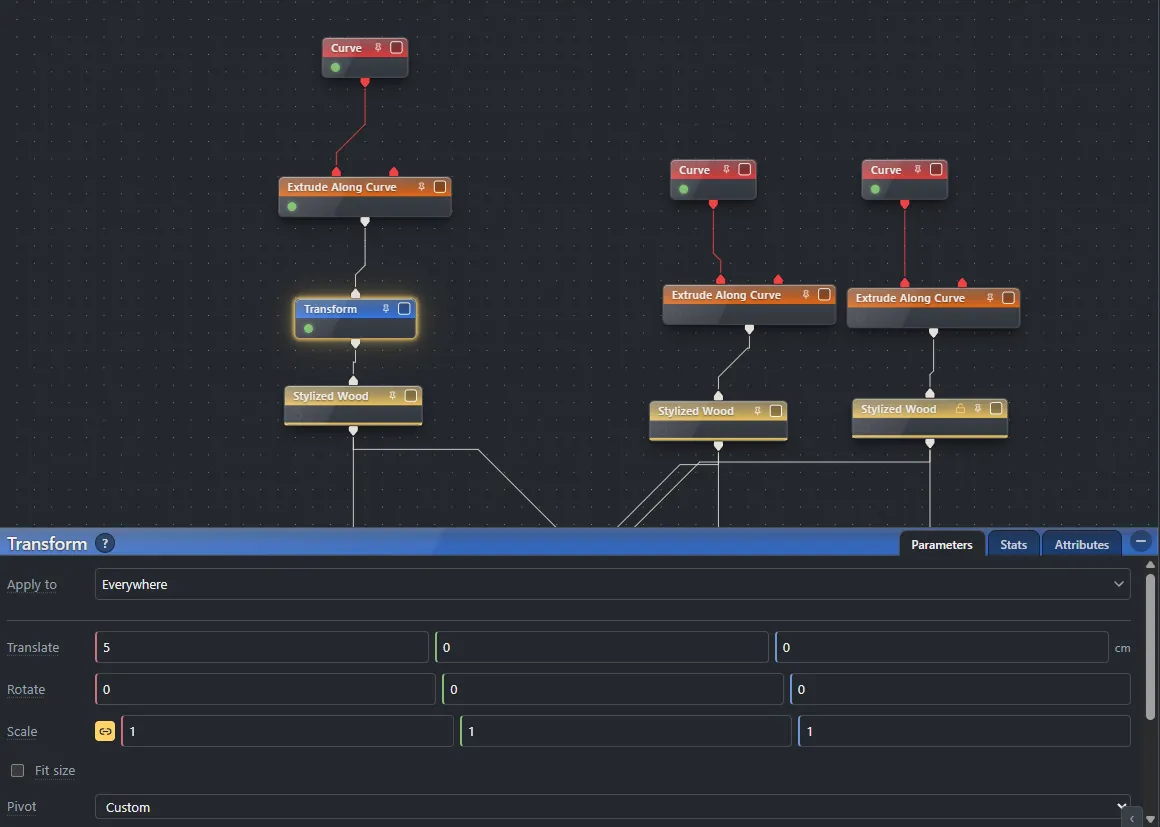
A node graph, from primitive to game asset
Every step is a node. Draw curves and sweep them into planks, merge and boolean the pieces, unwrap the UVs, then bake procedural wood and metal into the mesh. Change a node near the top and the whole graph re-cooks, so the asset stays editable the entire way down. When it is right, export clean glTF and drop it into your engine.
Characters: rigged and animated in the same graph
Forge works with characters too. Bring in a character model, from an AI generator, an asset store or your own modeling, and Forge cleans it to a triangle budget, cuts its UV seams, and rigs it with a Mixamo-compatible skeleton from nine markers you drag onto it. Skin weights are computed for you. Add ready-made Idle, Walk and Jog animations, draw a few curves through the hair to make it swing, and export one animated .glb that Unreal, Unity and Godot play straight away.
- Auto rig: a 25-joint skeleton with Mixamo's joint names, or 65 joints with fingers
- Idle, Walk and Jog clips included, free to use in any game
- Hair that swings, simulated and baked into every clip, with nothing to set up in your engine
- A Character template that does the whole chain: open it, choose your model, export
How it works, step by step: Characters, rigging and animation.
What you get
- Node-graph modeling: every operation is a node you can rewire, and the mesh re-cooks live
- Procedural texturing with PBR materials, baked into the mesh in the same graph
- Boolean, bevel, remesh, UV unwrap and bake, one graph from primitive to game asset
- Characters: auto-rig a humanoid model, add Idle, Walk and Jog animations and swinging hair, export one animated .glb
- Clean, game-ready meshes exported as glTF for Unreal, Unity and Godot
- Runs in the browser: no install, no account needed, your work stays on your machine
- Free, including for commercial games, with no royalty and no attribution
Every node is documented: Forge docs. See what changed since launch: the Forge changelog.
Coming from Houdini or Blender?
Forge borrows Houdini's best idea, a model that stays a graph of editable steps. Houdini is the procedural powerhouse of film and AAA, and it is priced and sized for that. Blender is free too, and a complete 3D suite with a lot to learn before a first game asset. Forge does one job: turn the model in your head into a usable, textured game mesh, with a handful of nodes and nothing to install.
| Aspect | Forge | Houdini | Blender |
|---|---|---|---|
| Price | Free | Paid licences; free Apprentice for non-commercial use only | Free and open source |
| Runs | In the browser, nothing to install | Desktop application | Desktop application |
| Scope | Game meshes, their materials, and rigged, animated characters | Full VFX and procedural pipeline | Full 3D suite |
| Learning curve | A few nodes and an afternoon | Months | Weeks to months |
| Commercial use | Yes, no attribution | Depends on the licence | Yes |
The full comparison, including texturing, export formats and when each tool is the right choice, is on the docs site: Forge vs Houdini vs Blender.
Open Forge in your browser
No install, no account. Your work stays on your machine, and finished meshes export as glTF for any engine.
Open Forge