Prepare a Character Model for Auto-Rigging
Get a character model ready to rig: real height, facing forward, an A-pose or T-pose, and an AI-generated mesh repaired so the auto rig binds cleanly.
An auto rigger is only as good as the model you give it. Most rigging problems people blame on the tool are really model problems: a character lying on its side, a stray fragment floating behind the head, or a scan with a hundred thousand triangles and cracks running through it. This page gets the model ready, using Forge. It is one card in Free Auto Rig for Game Characters.
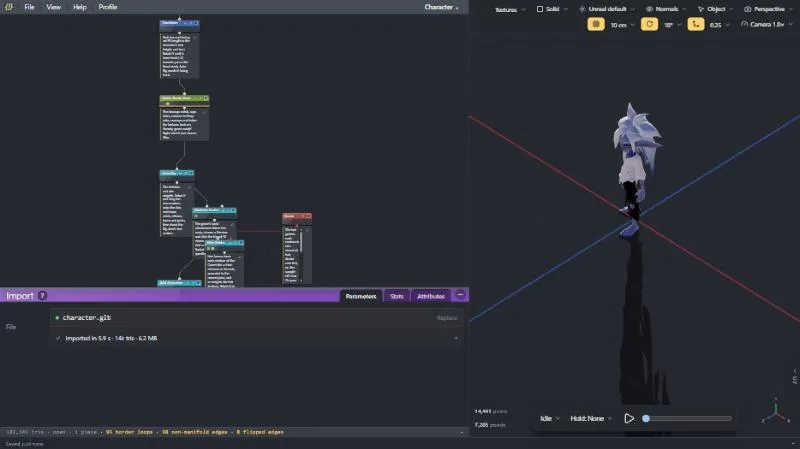
Import the model
Add an Import node and choose the character’s .glb or .gltf. Forge loads it with its
materials and textures. Look at the status bar under the graph: it reports the triangle count
and any surface problems. The character above came straight from an AI generator and arrived
with roughly 102,000 triangles, 95 border loops (holes) and 98 non-manifold edges. That is
typical, and all of it is worth fixing before the rig.
Give it its real size and facing
Wire a Transform node after Import and set two things:
- Fit size scales the character evenly so its height matches Fit length. Start at 180 cm for an adult human and adjust. Align stands the character on the ground at the centre of the world.
- Rotate around Y until the character faces +Z, towards you in the Front view. The character’s own left hand should end up on the +X side.
This matters more than it looks. Animation clips scale their hip motion to the character’s hip height, so a character at the wrong size walks with its feet in the floor or in the air.
Check the pose
Auto Rig expects a humanoid standing upright in an A-pose (arms angled down) or a T-pose (arms straight out). Arms glued to the torso, a crouch, or a character mid-stride all make the markers hard to place and the weights bleed between limbs. If your model came out of an AI generator in an odd pose, regenerate it in an A-pose; it is far easier than fixing it after.
Repair an AI-generated mesh
For a model that is already clean, skip this. For anything generated, scanned or kitbashed, the Game-Ready Mesh node does the repair in one step:
- welds cracks and removes loose fragments;
- caps small holes;
- reduces the triangle count to a budget (raise Keep ratio for a hero character, lower it for crowds);
- lays out new UVs and bakes the original textures back on at 2048 by 2048.
Loose parts matter for rigging in a specific way. The skin weights come from bone heat: each bone warms the surface it can see from inside the body, and that warmth spreads over the skin. A fragment floating outside the body sees no bone at all, so it gets bound to its closest bone instead and the node shows an amber note saying how many points it bound that way. Removing those fragments lets everything bind by heat.
Optional: clean UV seams
If you want predictable texture layouts, Character Seams cuts the character at the neck, shoulders, wrists, hips and ankles and down the side of each part, then Auto Unwrap lays out the UVs along those cuts. The face, body and every limb come out as separate islands. Follow it with Bake to carry the original textures onto the new UVs.
Rig last
The one rule to remember: do every modeling step before Auto Rig. A node that reshapes the mesh after it, such as Transform, Subdivide, Bevel or Boolean, drops the rig and shows an amber note. Paint nodes, Selection, Add Animation and the hair nodes keep it.
With the model sized, facing forward and clean, it is ready for the auto rig and skin weights.
Frequently asked questions
- What pose should a character be in for auto-rigging?
- Standing upright with the feet on the ground, in an A-pose (arms angled down) or a T-pose (arms straight out). The auto rig places joints from markers you drag in a front view, so the arms need to be clear of the body.
- Which way should the character face?
- Towards +Z, the front view. The character's left hand is then on the +X side. Turn it with a Transform node before Auto Rig if it faces another way.
- Why does my AI-generated character rig badly?
- AI meshes usually carry cracks, loose fragments, small holes and far more triangles than a game needs. A floating fragment sits outside the body, where no bone can reach it by bone heat, so it falls back to the closest bone. Clean the mesh before rigging and those problems go away.
- Should I cut UV seams before or after rigging?
- Before. Do all the modeling and UV work first and rig last. Any node that reshapes the mesh after Auto Rig drops the rig and says so.